Individual tax calendar
A year of personal tax dates in one sheet: your return, rental tax, instalments and reminders, with the days left to each.

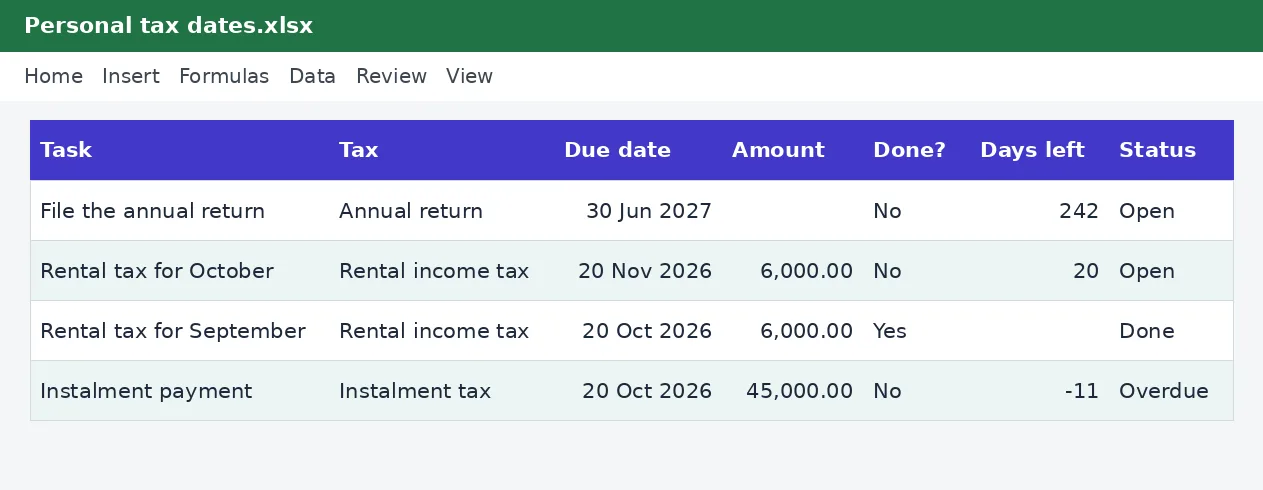
Individuals have fewer deadlines than businesses, but missing one still costs money. List the dates that apply to you, such as the annual return, monthly rental tax or instalment payments, with the amount if you know it. The calendar shows the days left, flags what is due soon or overdue and keeps a tick for what you have done.
Employees with side income, landlords and freelancers who want a simple personal tax calendar.
What is included
- Tasks with due dates and amounts
- Days left worked out from today
- Done, due soon, overdue or open status
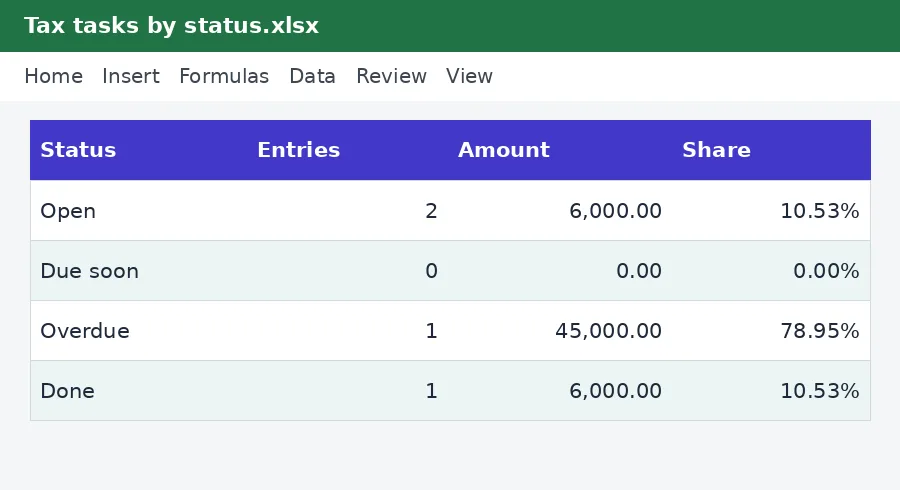
- Counts at the top
- Simple layout you can print
Advertisement
Screenshots
How to use it
- Type today's date at the top.
- List each tax task with its due date and the amount, if known.
- Mark it done when you have filed or paid.
- Check the due soon and overdue counts every week.
Templates are tools to help with your own records. They are not tax or legal advice. Check the figures against official sources before filing or paying.
Advertisement
More in this category
-
 Taxpdf
Tax audit survival guide
What to do when KRA announces an audit: the types, your rights, the documents to prepare and how to respond.
KES 1,080KES 1,200-10%
View details →
-
 Taxpdf
Rental income tax guide for landlords
Monthly rental tax or annual return? How landlords register, file, pay and keep records, with a worked example.
KES 720KES 800-10%
View details →
-
 Taxpdf
Withholding tax guide for Kenyan businesses
Who must withhold tax, on which payments, at what rates, and how to remit, issue certificates and keep records.
KES 720KES 800-10%
View details →
What the individual tax calendar does
Individuals have fewer deadlines than businesses, but missing one still costs money. List the dates that apply to you, such as the annual return, monthly rental tax or instalment payments, with the amount if you know it. The calendar shows the days left, flags what is due soon or overdue and keeps a tick for what you have done.
Who it is for
Employees with side income, landlords and freelancers who want a simple personal tax calendar.
How to use the workbook
- Type today's date at the top.
- List each tax task with its due date and the amount, if known.
- Mark it done when you have filed or paid.
- Check the due soon and overdue counts every week.
- Save a copy under a new name for each month or year, so earlier records stay as they were.
What is inside
- Tasks with due dates and amounts
- Days left worked out from today
- Done, due soon, overdue or open status
- Counts at the top
- Simple layout you can print
The workbook has these sheets: Instructions, Calendar, Summary. The main table has the columns Task; Tax; Due date; Amount; Done?; Days left; Status. Yellow cells are for you to fill in and grey cells calculate by themselves, so leave the grey cells alone. The example rows show how it works; type over them with your own entries.
Tips for getting it right
- Check each date with KRA for the current year.
- File and pay a few days early.
- Keep the acknowledgement and the receipt with the tick.
- Add dates for any new income you start.
Why keep this record
Most tax trouble comes from late or missing records rather than from the tax itself. When the figures are collected as they happen, preparing a return becomes a matter of copying totals, not of searching for receipts. A workbook that follows the same layout as the return also makes it easier to spot a number that looks wrong before KRA does, and to explain it if asked.
Questions people ask
Do I need to know Excel formulas? No. Type into the yellow cells and the rest is worked out for you. The formulas are visible if you want to see how a figure is reached.
Can I add rows or change the layout? You can add your own columns to the right and your own notes. If you insert rows inside a table, copy the grey formula cells down so the new rows calculate too.
Will it work on my phone or in Google Sheets? Yes for viewing and typing, but dropdown lists and the charts look best in desktop Excel or LibreOffice.
Keeping it safe and up to date
Tax figures change with each Finance Act, so check the Rates sheet against KRA's current guidance before you file. Keep the supporting documents with the workbook, and keep each year's copy for at least five years in case KRA asks for proof.
Read the KRA filing calendar for small businesses for the wider picture. Free calculators that go with it: Kra penalty calculator, P9 tax return calculator. See more tax templates or ask us for a custom one.
The workbook works in Microsoft Excel, LibreOffice and Google Sheets. It is a tool to help you work out and record figures, not tax, legal or accounting advice, and it is not affiliated with the Kenya Revenue Authority. If something does not work as described, contact us and we will put it right.
Related guides, calculators and templates
- Free calculator: KRA Late Filing Penalty and Interest Calculator
- Free calculator: Annual Tax Return Estimator (P9)
- Guide: How KRA uses data matching and what it means for you
- Guide: How to handle a pay delay from your employer
- Guide: What happens after a court or tribunal ruling in a tax case
- Another template: Annual income tax estimator
- Another template: Employee tax return document checklist
- Another template: Excise duty return workbook
Need something different? Request a custom template, browse all guides or see every Excel template.
Scroll inside the box to read more.