Supplier payment run planner
Choose which supplier invoices to pay this run, take early-payment discounts and stay within the cash you have available.

Paying suppliers is a daily balancing act between cash, relationships and discounts. This planner lists each invoice with its due date, amount, any early-payment discount and priority, lets you mark which to pay in this run, and shows the total selected, the cash left and a warning if you have chosen more than you have.
Finance managers, accountants and owners who pay suppliers in weekly or monthly runs and want to decide who to pay first when cash is tight.
What is included
- Early-payment discount worked out
- Priority and pay-this-run choice for each invoice
- Total selected and cash left
- A warning if you over-commit cash
- Space for 200 invoices
Advertisement
Screenshots
How to use it
- Enter the cash available for this run.
- List each unpaid invoice with its due date, amount and any discount percentage.
- Set the priority and mark Yes for the invoices to pay now.
- Check the total and the cash left before you release payments.
Templates are tools to help with your own records. They are not tax or legal advice. Check the figures against official sources before filing or paying.
Advertisement
More in this category
-
 Accountingpdf
Credit control policy and collection letters
A credit policy and four collection letters, from a friendly reminder to a final demand, to get paid on time.
KES 810KES 900-10%
View details →
-
 Accountingpdf
Audit preparation guide for small businesses
How to prepare for an annual audit: documents, schedules, timeline and what the auditor will ask.
KES 900KES 1,000-10%
View details →
-
 Accountingpdf
Internal controls checklist for small businesses
A practical checklist of controls that protect a small business from error and fraud: cash, sales, purchases and payroll.
KES 720KES 800-10%
View details →
What the supplier payment run planner does
Paying suppliers is a daily balancing act between cash, relationships and discounts. This planner lists each invoice with its due date, amount, any early-payment discount and priority, lets you mark which to pay in this run, and shows the total selected, the cash left and a warning if you have chosen more than you have.
Who it is for
Finance managers, accountants and owners who pay suppliers in weekly or monthly runs and want to decide who to pay first when cash is tight.
How to use the workbook
- Enter the cash available for this run.
- List each unpaid invoice with its due date, amount and any discount percentage.
- Set the priority and mark Yes for the invoices to pay now.
- Check the total and the cash left before you release payments.
- Save a copy under a new name for each month or year, so earlier records stay as they were.
What is inside
- Early-payment discount worked out
- Priority and pay-this-run choice for each invoice
- Total selected and cash left
- A warning if you over-commit cash
- Space for 200 invoices
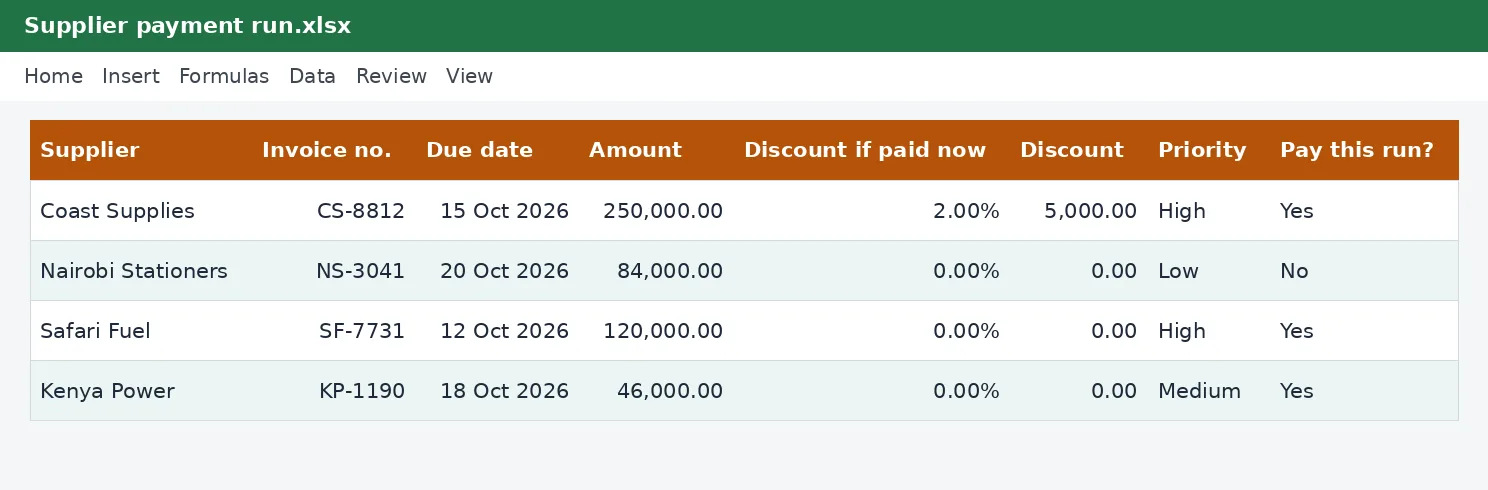
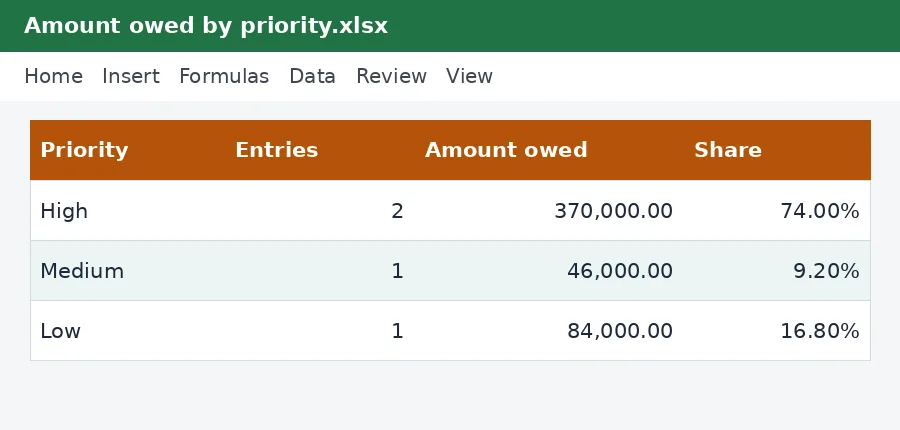
The workbook has these sheets: Instructions, Run, Summary. The main table has the columns Supplier; Invoice no.; Due date; Amount; Discount if paid now; Discount; Priority; Pay this run?. Yellow cells are for you to fill in and grey cells calculate by themselves, so leave the grey cells alone. The example rows show how it works; type over them with your own entries.
Tips for getting it right
- Pay critical suppliers and statutory amounts first.
- Take discounts only if the saving is worth more than the cash held.
- Agree a payment plan before an invoice becomes late.
- Record the payment run in your cashbook the same day.
Why keep this record
Accounting records let you answer three questions at any time: what came in, what went out and who owes whom. Kept consistently they also make tax returns, loan applications and the sale of a business much easier, because the evidence is already organised. Entering transactions the day they happen is far cheaper than reconstructing them at year end.
Questions people ask
Do I need to know Excel formulas? No. Type into the yellow cells and the rest is worked out for you. The formulas are visible if you want to see how a figure is reached.
Can I add rows or change the layout? You can add your own columns to the right and your own notes. If you insert rows inside a table, copy the grey formula cells down so the new rows calculate too.
Will it work on my phone or in Google Sheets? Yes for viewing and typing, but dropdown lists and the charts look best in desktop Excel or LibreOffice.
Keeping it safe and up to date
Good accounting records are a legal duty as well as a management tool: keep the supporting receipts and invoices with the workbook, and keep each year's copy for at least five years. Work on a copy, never on your only file, and back it up.
Read how to keep business records for KRA for the wider picture. See more accounting templates or ask us for a custom one.
The workbook works in Microsoft Excel, LibreOffice and Google Sheets. It is a tool to help you work out and record figures, not tax, legal or accounting advice, and it is not affiliated with the Kenya Revenue Authority. If something does not work as described, contact us and we will put it right.
Related guides, calculators and templates
- Guide: How to keep business records for KRA: what to save and for how long
- Guide: Bank reconciliation step by step: match your books to your bank
- Guide: Fixed assets and capital allowances explained for small businesses
- Another template: Balance sheet template
- Another template: Bank reconciliation statement
- Another template: Chart of accounts and general ledger
Need something different? Request a custom template, browse all guides or see every Excel template.
Scroll inside the box to read more.