Bank reconciliation statement
Prove that your cashbook and your bank statement agree, and find the difference when they do not.

A bank reconciliation is the check that catches errors, duplicate payments and fraud. Enter the statement balance and the cashbook balance, list the deposits and payments the bank has not yet shown and the bank items you have not yet recorded, and the workbook tells you whether the two agree and by how much they differ.
What is included
- Bank side and cashbook side on one page
- Deposits in transit and uncleared payments
- Bank charges and interest not yet recorded
- Difference must be zero, with a clear message
- Example that reconciles
Advertisement
Screenshots
How to use it
- Enter the closing balances.
- List deposits in transit and uncleared payments.
- List bank items not yet in the cashbook.
- The difference must be zero.
Templates are tools to help with your own records. They are not tax or legal advice. Check the figures against official sources before filing or paying.
Advertisement
More in this category
-
 Accountingpdf
Credit control policy and collection letters
A credit policy and four collection letters, from a friendly reminder to a final demand, to get paid on time.
KES 810KES 900-10%
View details →
-
 Accountingpdf
Audit preparation guide for small businesses
How to prepare for an annual audit: documents, schedules, timeline and what the auditor will ask.
KES 900KES 1,000-10%
View details →
-
 Accountingpdf
Internal controls checklist for small businesses
A practical checklist of controls that protect a small business from error and fraud: cash, sales, purchases and payroll.
KES 720KES 800-10%
View details →
The two numbers that must agree, and the check most businesses skip
Your bank statement says one thing and your cashbook says another. Both can be right at the same time, because the bank and your books record the same transactions on different days. The bank reconciliation is the short exercise that explains the difference and proves that nothing has gone missing. It is one of the oldest controls in accounting and one of the most effective: reconciliations catch duplicated payments, bank errors, unrecorded charges and, occasionally, fraud. This workbook lays it out so that you can do it in about fifteen minutes.
Why the two balances differ
There are four common reasons, and the workbook has a place for each.
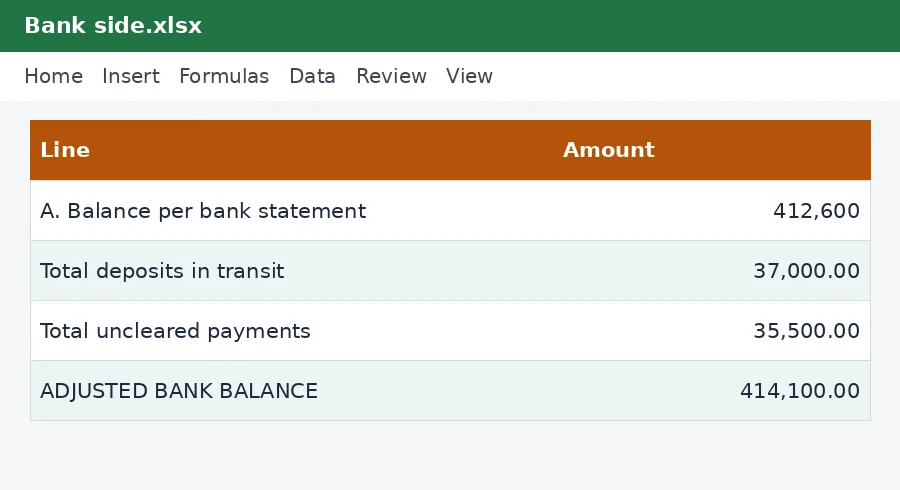
- Deposits in transit: you banked money, and it is in your cashbook, but it has not yet appeared on the statement.
- Uncleared payments: you issued a cheque or made a transfer and recorded it, but the bank has not yet paid it.
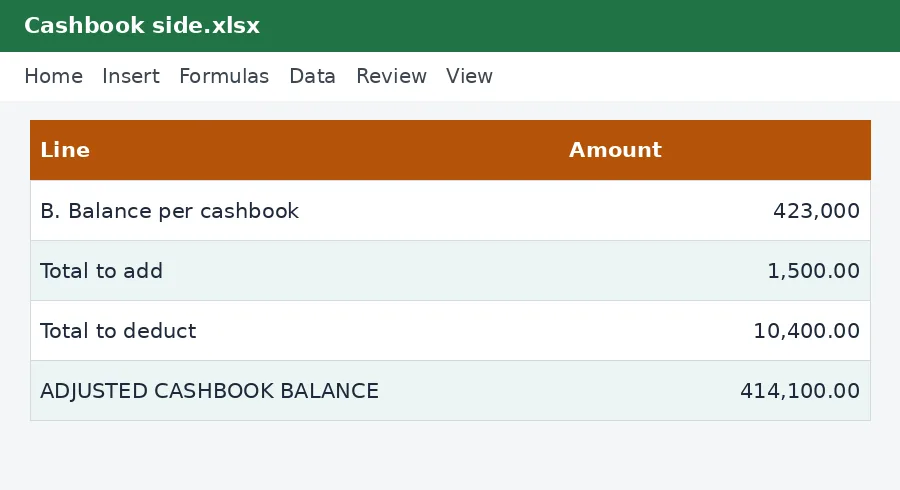
- Bank items you have not recorded: charges, interest earned, standing orders, direct debits and deposits made by customers directly into your account.
- Errors: a number typed wrongly, a payment recorded twice, or a mistake by the bank.
How the workbook is organised
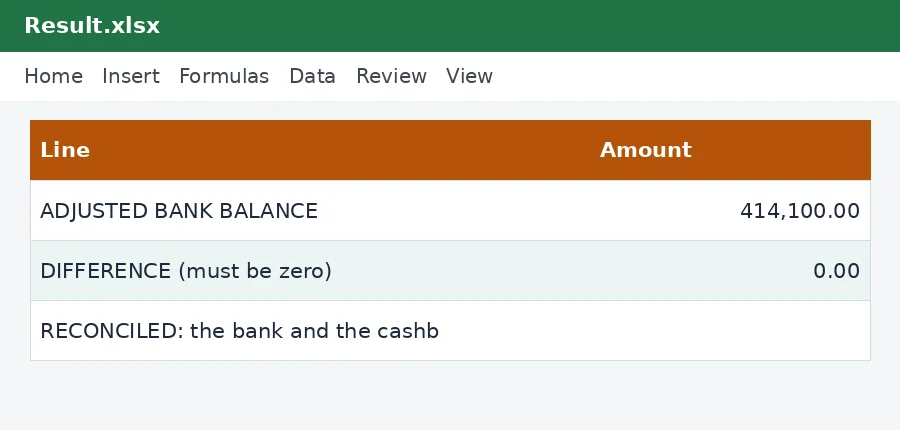
The page is split into two columns. On the left is the bank side: the closing balance on the statement, plus deposits in transit, less payments not yet cleared, which gives the adjusted bank balance. On the right is the cashbook side: the closing balance in your cashbook, plus bank items such as interest that you have not yet recorded, less items such as charges that you have not yet recorded, which gives the adjusted cashbook balance. If everything has been recorded correctly, the two adjusted balances are equal, and the difference at the bottom is zero.
Reading the result
The difference cell is the answer. When it is zero, the sheet says RECONCILED. When it is not, it says so in so many words, and you have a problem to find. Start by checking that you copied the balances correctly. Then compare the items on the statement with your cashbook, one by one, and tick each. Anything on one side only is either a timing difference to list or a missing entry to record. Look for a difference that equals one transaction exactly, or exactly twice a transaction, which suggests a duplicate. A difference divisible by nine often means two digits were swapped.
Doing it step by step
- Get the statement for the month and the closing cashbook balance for the same date.
- Enter the bank name, the date and both closing balances.
- Tick off every item that appears in both the cashbook and the statement.
- List the cashbook receipts that are not on the statement as deposits in transit.
- List the cashbook payments that are not on the statement as uncleared payments.
- List the statement items that are not in the cashbook on the right-hand side, receipts above, charges below.
- Check the difference. Then record the new items in your cashbook so that it is up to date.
How often, and by whom
Reconcile every account every month, within a few days of receiving the statement, and busier businesses do it weekly. Ideally the person who reconciles is not the person who handles the cash or records the payments, because that separation is what makes the control work. If you are a small business with one person, ask someone else to look at the finished reconciliation and initial it. Keep each month's sheet with the statement it relates to. Records should be kept for at least five years.
Connected records
The cashbook in this collection feeds the right-hand side, and the supplier payments tracker helps you see which payments should have cleared. If you pay tax by bank transfer, record each payment in the tax payments log, so that the reconciliation shows them as cleared and a missing one stands out. Our guide to nil returns and filing explains why complete records matter at filing time.
This workbook is a record-keeping tool and not accounting or tax advice. For guidance on keeping financial records, see the Kenya Revenue Authority and speak to an accountant if a difference cannot be explained.
Related guides, calculators and templates
- Guide: How to keep business records for KRA: what to save and for how long
- Guide: Bank reconciliation step by step: match your books to your bank
- Guide: Fixed assets and capital allowances explained for small businesses
- Another template: Customer invoices and aged receivables tracker
- Another template: Expense tracker with VAT
- Another template: Fixed asset register with depreciation and capital allowances
Need something different? Request a custom template, browse all guides or see every Excel template.
Scroll inside the box to read more.