Customer invoices and aged receivables tracker
Record each customer invoice and payment, age every unpaid balance, and see whom to chase and how firmly, with a ready-written reminder.

Profit is not cash until the customer pays. This tracker lists every invoice with its due date, shows the balance and how many days overdue it is, puts it in an age bucket (not yet due, 1 to 30, 31 to 60, 61 to 90, over 90 days) and tells you the next action. A summary shows who owes what, and a reminder sheet writes a polite message for any invoice.
What is included
- Up to 300 invoices with partial payments
- Due dates from your payment terms
- Ageing buckets and a suggested action
- Summary by age and by customer
- Reminder message for any invoice
Advertisement
Screenshots
How to use it
- Set your terms and reminder days on the Rates sheet.
- Enter each invoice and payment.
- Check the Ageing and Action columns weekly.
- Use the Reminder sheet to chase.
Rates and thresholds
Edit the terms and reminder days on the Rates sheet.
Templates are tools to help with your own records. They are not tax or legal advice. Check the figures against official sources before filing or paying.
Advertisement
More in this category
-
 Accountingpdf
Credit control policy and collection letters
A credit policy and four collection letters, from a friendly reminder to a final demand, to get paid on time.
KES 810KES 900-10%
View details →
-
 Accountingpdf
Audit preparation guide for small businesses
How to prepare for an annual audit: documents, schedules, timeline and what the auditor will ask.
KES 900KES 1,000-10%
View details →
-
 Accountingpdf
Internal controls checklist for small businesses
A practical checklist of controls that protect a small business from error and fraud: cash, sales, purchases and payroll.
KES 720KES 800-10%
View details →
Sales are an opinion. Cash is a fact.
A business that sells on credit is a bank for its customers, and like any lender it needs to know who owes what and for how long. The longer an invoice stays unpaid, the less likely it is to be paid at all, and the more it costs you in borrowing, missed opportunities and worry. The simplest discipline in credit control is an ageing report: every unpaid invoice sorted by how overdue it is. This tracker builds that report from your invoice list and tells you, for each one, what to do next.
What the tracker records and calculates
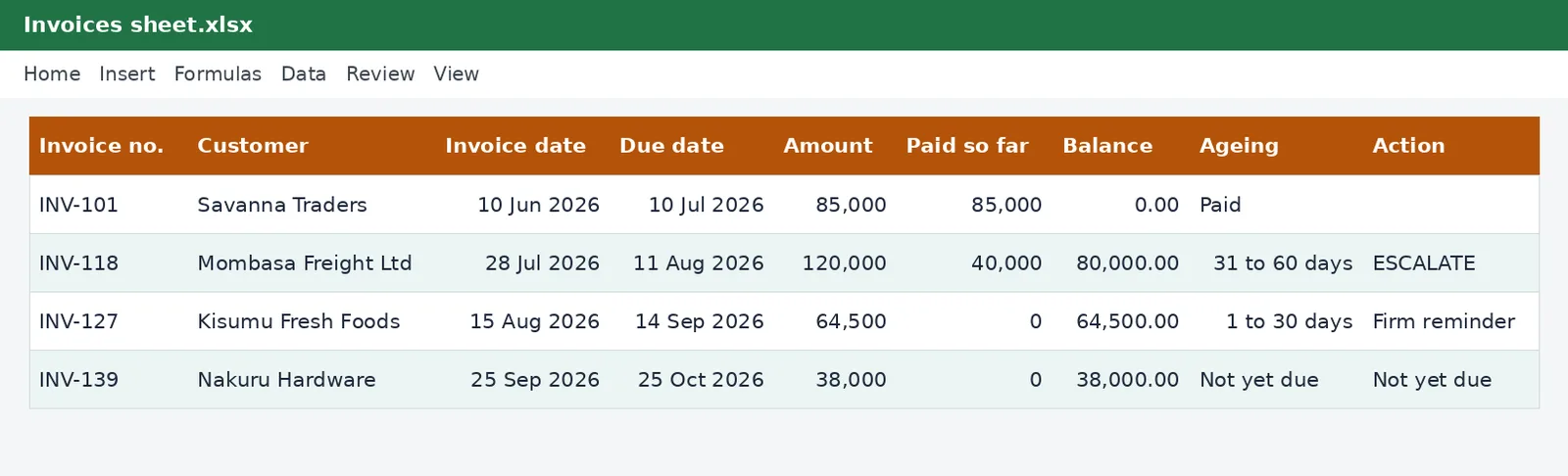
On the Invoices sheet you enter the invoice number, customer, invoice date, the amount and any payments received. If a customer has special terms, enter the number of days. Otherwise the tracker uses your usual terms. It then works out, for each invoice:
- the due date from the invoice date and the terms;
- the balance still owed after part payments;
- the days overdue, counted from the due date to today;
- the age bucket: not yet due, 1 to 30 days, 31 to 60 days, 61 to 90 days, or over 90 days;
- a suggested action: not yet due, send reminder, firm reminder or ESCALATE, using the days you set on the Rates sheet.
The summary sheet
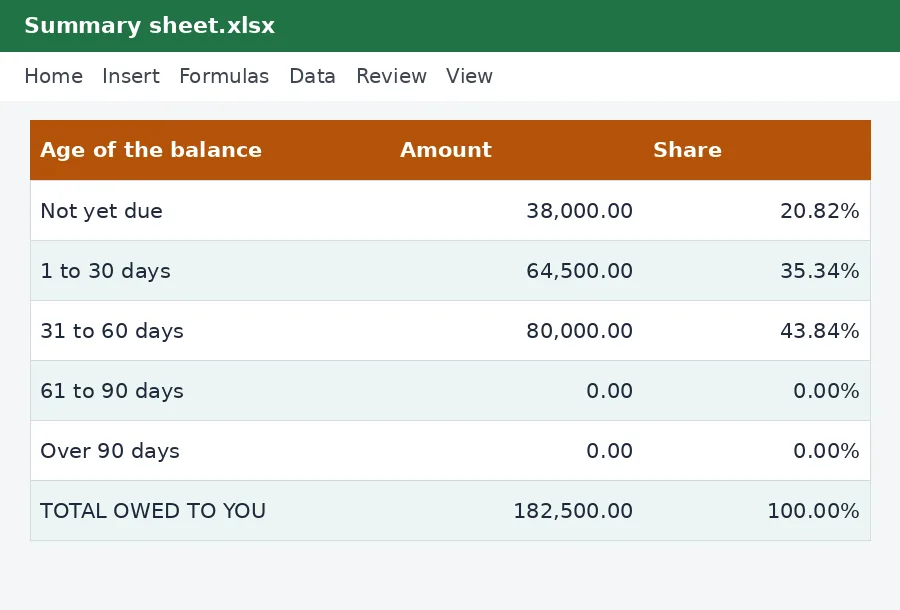
The Summary sheet adds up the unpaid balances in each age bucket, shows each as a share of the total, and gives the total owed and the total overdue. A second table lists the balance owed by each customer: type your customers' names once and the figures follow. This is the report to look at every Monday, and the one your bank or an investor will ask for. If most of the balance sits in the older columns, you have a collection problem, not a sales problem.
Writing the reminder
Many people delay chasing because they do not know what to say. The Reminder sheet writes it for you. Type an invoice number and it pulls the customer, the balance, the due date and the days overdue into a polite message, which you can copy into an email or a WhatsApp message. Start friendly, because most late payment is forgetfulness, and become firmer as the days pass.
A weekly credit control routine
- Record every payment received since last week against its invoice.
- Open the Summary sheet and look at the overdue total.
- Filter the Action column for Send reminder, Firm reminder and ESCALATE.
- Contact each customer, in that order of urgency, and note what they promise.
- Stop or limit new credit to customers who are well overdue.
Preventing the problem
The cheapest overdue invoice is the one that was never allowed to become overdue. Agree payment terms in writing before you start. Send the invoice the day the work is done, with your payment details on it, and make it easy to pay by M-Pesa or bank transfer. For large jobs, take a deposit. Check new customers before you give credit, and set a limit for each. Consider stating on your invoices that you may charge interest on late payments, if your contract allows it.
Tax points on unpaid invoices
If you account for VAT on an invoice basis, you owe the VAT on a sale in the period you issue the invoice, even if the customer has not paid you. That makes late payers expensive: you pay the tax before you are paid. Our VAT calculator shows the VAT in a figure, and the VAT return working sheet in this collection sets out the period. Where a debt really becomes bad, the tax rules may allow relief on the VAT and a deduction for the bad debt, subject to conditions, so ask your adviser before you write one off and keep the evidence of your efforts to collect. Our guide to eTIMS e-invoicing explains the invoices you are required to issue.
Using the numbers to run the business
Divide the total owed by your average daily sales and you have the number of days it takes you to collect, a figure worth tracking over time. Put the expected collections into your cash flow forecast, and let your history, not your hopes, guide the timing.
This workbook is a credit-control and record-keeping tool and not legal, tax or accounting advice. For debt recovery, take advice from a lawyer, and for tax treatment, see the Kenya Revenue Authority or ask your accountant.
Related guides, calculators and templates
- Free calculator: VAT Calculator
- Guide: VAT for small businesses in Kenya: when to register and what to charge
- Guide: How to file a VAT return on iTax, step by step
- Guide: How to price your products and services: markup, margin and break-even
- Another template: Expense tracker with VAT
- Another template: Invoice with VAT
- Another template: Quotation with VAT
Need something different? Request a custom template, browse all guides or see every Excel template.
Scroll inside the box to read more.