Invoice with VAT
A clean invoice with VAT worked out, ready to print or save as a PDF.

Type your details, your customer's details and the items. VAT and the total are worked out for you, and you can switch VAT off for customers or items where it does not apply.
What is included
- Up to 15 line items
- VAT on or off
- Space for M-Pesa and bank details
Advertisement
Screenshots
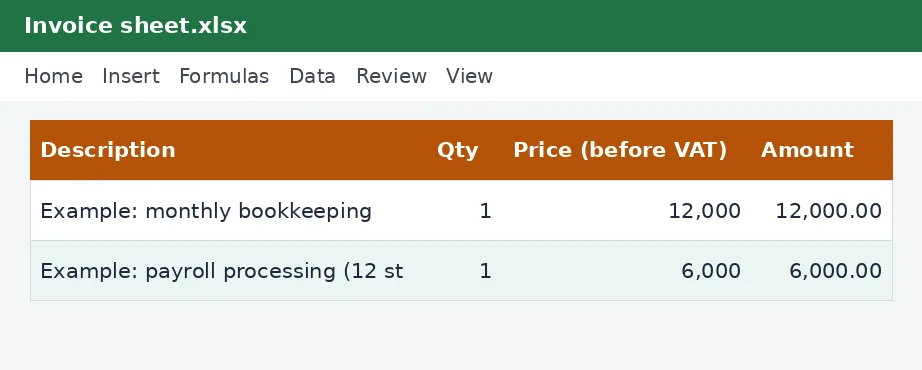
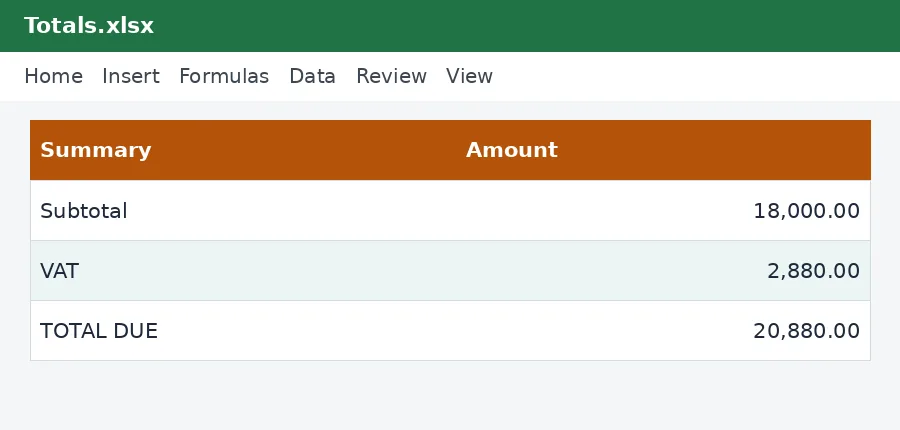
How to use it
- Fill in your details and the customer's.
- List the items.
- Print or save as PDF.
Rates and thresholds
Edit the VAT rate on the Rates sheet if it changes.
Templates are tools to help with your own records. They are not tax or legal advice. Check the figures against official sources before filing or paying.
Advertisement
More in this category
-
 Accountingpdf
Credit control policy and collection letters
A credit policy and four collection letters, from a friendly reminder to a final demand, to get paid on time.
KES 810KES 900-10%
View details →
-
 Accountingpdf
Audit preparation guide for small businesses
How to prepare for an annual audit: documents, schedules, timeline and what the auditor will ask.
KES 900KES 1,000-10%
View details →
-
 Accountingpdf
Internal controls checklist for small businesses
A practical checklist of controls that protect a small business from error and fraud: cash, sales, purchases and payroll.
KES 720KES 800-10%
View details →
A professional invoice you can make in two minutes
An invoice is how you ask to be paid, and how you prove what was agreed. A clear one gets paid faster, causes fewer arguments and gives your customer what they need for their own records. This free workbook gives you a clean invoice layout with the sums done for you. You type your details, your customer's details and the items, choose whether VAT applies, and print the sheet or save it as a PDF.
What a good invoice contains
- The word Invoice, a unique invoice number and the date.
- Your business name, address, contact details and KRA PIN.
- Your customer's name, address and PIN, which they often need to claim the cost.
- A description of each item or service, the quantity and the price.
- The subtotal, the VAT if you charge it, and the total due.
- Your payment terms and how to pay: M-Pesa Paybill or Till, or bank details.
How the workbook works
On the Invoice sheet, the yellow cells are yours to fill in. Enter the details at the top and then list up to fifteen line items, each with a description, a quantity and a price before VAT. The amount for each line, the subtotal, the VAT and the total are worked out by the workbook. A yes-or-no switch decides whether VAT is charged, so the same file works for VAT-registered and unregistered customers, and for items that are zero-rated or exempt. The VAT rate is held on the Rates sheet and is currently 16%.
Numbering and saving
Give each invoice a unique, sequential number, such as INV-001, INV-002, and never reuse one. Save each invoice as a PDF named with the number and the customer, and keep a copy. Sequential numbers make it easy to see if one is missing, and they are what an auditor expects to find.
VAT on invoices
If your taxable turnover is above KES 5,000,000 a year, you must register for VAT and charge it on standard-rated sales. If you are registered, your invoice should show your VAT registration details and the VAT charged. If you are not, you should not charge VAT. Whether a particular supply is standard-rated, zero-rated or exempt depends on what it is, so check if you are unsure. The VAT calculator will add or remove VAT from a price, and the VAT return working sheet takes your invoices through to your return.
A very important note about eTIMS
Many Kenyan businesses are now required to issue tax invoices through the Kenya Revenue Authority's electronic tax invoice system, eTIMS. If you are required to, an invoice made in a spreadsheet is not a substitute for an eTIMS invoice. Your customer may not be able to claim the expense or the VAT on it. Read our guide to eTIMS e-invoicing to find out whether the rule applies to you. This workbook is best used by businesses that are not yet required to use eTIMS, as a pro-forma invoice or quotation, or alongside your eTIMS invoices as a summary document.
Getting paid sooner
- Send the invoice as soon as the work is done or the goods are delivered.
- State the due date clearly, for example 14 days from the invoice date.
- Make paying easy by putting the Paybill, Till number or bank account on the invoice.
- Follow up politely a few days before and after the due date.
- Keep a list of unpaid invoices, so nothing is forgotten.
Keeping the records
Invoices you issue are part of your tax records, and you should keep them for at least five years. They support your sales figures, your VAT return and your income tax computation. The KRA PIN guide is useful if a customer asks for yours.
This workbook is a document template and not legal, tax or accounting advice. The VAT rate on its Rates sheet comes from the KenyaTax rates table and has not yet been verified for the period, so confirm it with the Kenya Revenue Authority.
Related guides, calculators and templates
- Free calculator: VAT Calculator
- Guide: VAT for small businesses in Kenya: when to register and what to charge
- Guide: How to file a VAT return on iTax, step by step
- Guide: How to price your products and services: markup, margin and break-even
- Another template: Customer invoices and aged receivables tracker
- Another template: Expense tracker with VAT
- Another template: Quotation with VAT
Need something different? Request a custom template, browse all guides or see every Excel template.
Scroll inside the box to read more.