Expense tracker with VAT
Record business expenses with their VAT, mark which are allowable, and see totals by category.

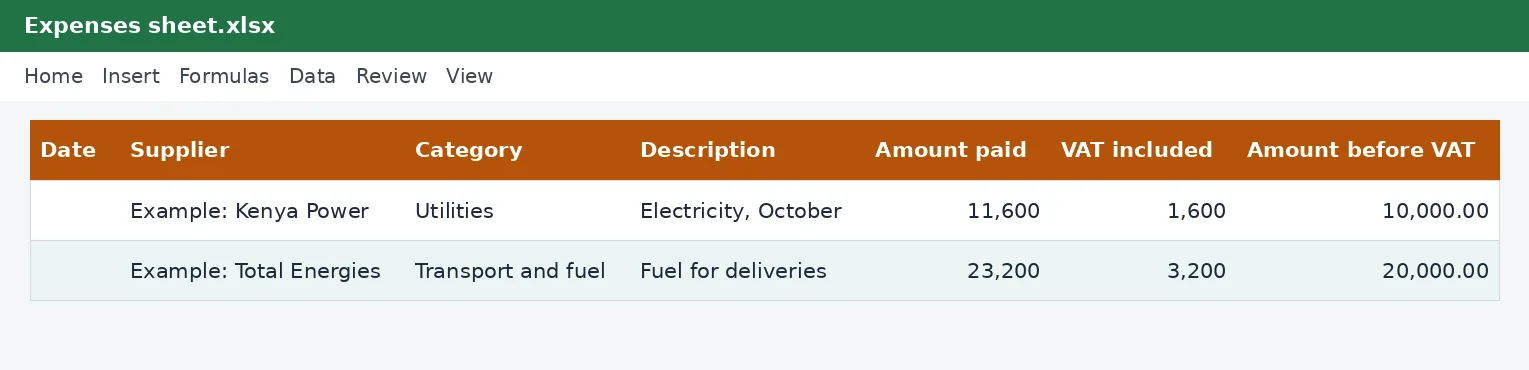
Keep every business expense in one list: supplier, category, amount paid and the VAT in it. See totals by category, the VAT included, and the allowable total for your accounts and tax return.
What is included
- Categories from a list
- VAT separated from each amount
- Allowable and non-allowable expenses
- Summary by category
Advertisement
Screenshots
How to use it
- Record each expense.
- Mark if it is allowable.
- Check the Summary sheet.
Templates are tools to help with your own records. They are not tax or legal advice. Check the figures against official sources before filing or paying.
Advertisement
More in this category
-
 Accountingpdf
Credit control policy and collection letters
A credit policy and four collection letters, from a friendly reminder to a final demand, to get paid on time.
KES 810KES 900-10%
View details →
-
 Accountingpdf
Audit preparation guide for small businesses
How to prepare for an annual audit: documents, schedules, timeline and what the auditor will ask.
KES 900KES 1,000-10%
View details →
-
 Accountingpdf
Internal controls checklist for small businesses
A practical checklist of controls that protect a small business from error and fraud: cash, sales, purchases and payroll.
KES 720KES 800-10%
View details →
Know what your business spends, and what you can claim back
Every business spends money, and nearly every business forgets some of it when the year ends. A receipt left in a pocket, a payment made from a personal M-Pesa, a bill paid by a colleague: these are real costs that reduce your profit and your tax, but only if you can show them. An expense tracker gives every cost a home on the day it happens. This workbook records each expense with its VAT, sorts them into categories, flags which ones are allowable for tax, and totals everything for you.
What to record for every expense
- The date and the supplier.
- The category, chosen from a list: rent, salaries, utilities, transport and fuel, stock and materials, marketing, professional fees, insurance, repairs, bank charges and other.
- A short description of what it was for.
- The amount paid and the VAT included in it, if any.
- Whether the expense is allowable for tax purposes.
- The receipt or invoice number, so you can find the document later.
How the workbook helps
On the Expenses sheet, you fill in a row for each cost. The workbook subtracts the VAT to show the amount before VAT. On the Summary sheet, it totals each category: the total paid, the VAT included, the amount before VAT, and the total of expenses you marked as allowable. The workbook has room for 500 expenses. You will see at a glance which categories take most of your money, and your accountant will find the year-end work much quicker.
Two columns that save you money
Separating the VAT included matters if you are registered for VAT. You may be able to claim that VAT back on your return, provided you hold a valid tax invoice for the purchase. The standard VAT rate is currently 16%, and our VAT calculator will split a price into the amount and the VAT when a receipt does not show it. The Allowable column matters for income tax: expenses incurred wholly and exclusively to earn business income are generally deductible, while private spending and certain other items are not.
Why receipts are not optional
When KRA reviews a return, an expense is only as good as its evidence. For purchases from VAT-registered suppliers, a valid electronic tax invoice is increasingly the expected evidence, and an expense without one may be challenged. Our guide to eTIMS e-invoicing explains the current position. Photograph or scan every receipt, name the file with the date and the supplier, and write the receipt number in the tracker. Keep the records for at least five years.
A weekly habit that pays off
- Once a week, gather the receipts, M-Pesa messages and supplier bills for the week.
- Enter each one in the tracker with its category and VAT.
- Mark which ones are allowable. If in doubt, mark them No and ask your accountant.
- Check the weekly total against your bank or M-Pesa statement to catch missing entries.
- At the end of the month, read the Summary sheet and compare it with your budget.
Using the numbers
The category totals are the starting point for your accounts and your tax computation. If you are on turnover tax, your expenses do not reduce the tax, but knowing them still tells you whether the business is profitable. If you pay tax on profit, allowable expenses reduce it, so a complete tracker can lower your bill. If you are registered for VAT, the VAT column feeds your return. For employers, salary costs are better handled in the monthly payroll workbook, and the total can be entered here in the Salaries category.
This workbook is a record-keeping aid and not accounting or tax advice. Whether an expense is allowable, and whether VAT on it can be claimed, depends on the rules and on your circumstances, so check with a tax adviser or the Kenya Revenue Authority if you are unsure.
Related guides, calculators and templates
- Free calculator: VAT Calculator
- Guide: VAT for small businesses in Kenya: when to register and what to charge
- Guide: How to file a VAT return on iTax, step by step
- Guide: How to price your products and services: markup, margin and break-even
- Another template: Customer invoices and aged receivables tracker
- Another template: Invoice with VAT
- Another template: Quotation with VAT
Need something different? Request a custom template, browse all guides or see every Excel template.
Scroll inside the box to read more.