KRA filing and payment calendar
Every filing and payment deadline that applies to you for the year in one list, with a Done column and a status that shows what is overdue.

Tell the calendar which taxes apply to you and it lists every due date for the year: PAYE and the other payroll payments, VAT, turnover tax, monthly rental income, withholding tax, income tax instalments and the annual returns. Tick each one off as you file and pay, and the status tells you what is overdue and how many days are left on the rest.
What is included
- Monthly, quarterly and yearly deadlines in one list
- Only shows what applies to you
- Done column and automatic status
- Days left on every open deadline
- Filter buttons on every column
Advertisement
Screenshots
How to use it
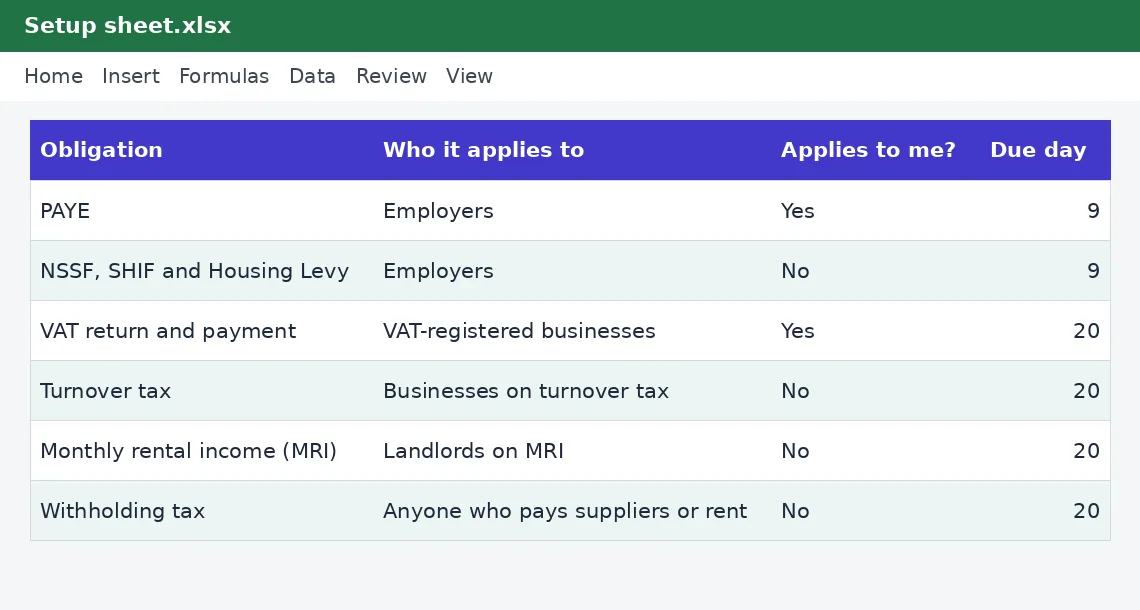
- On Setup, choose Yes for each obligation that applies to you.
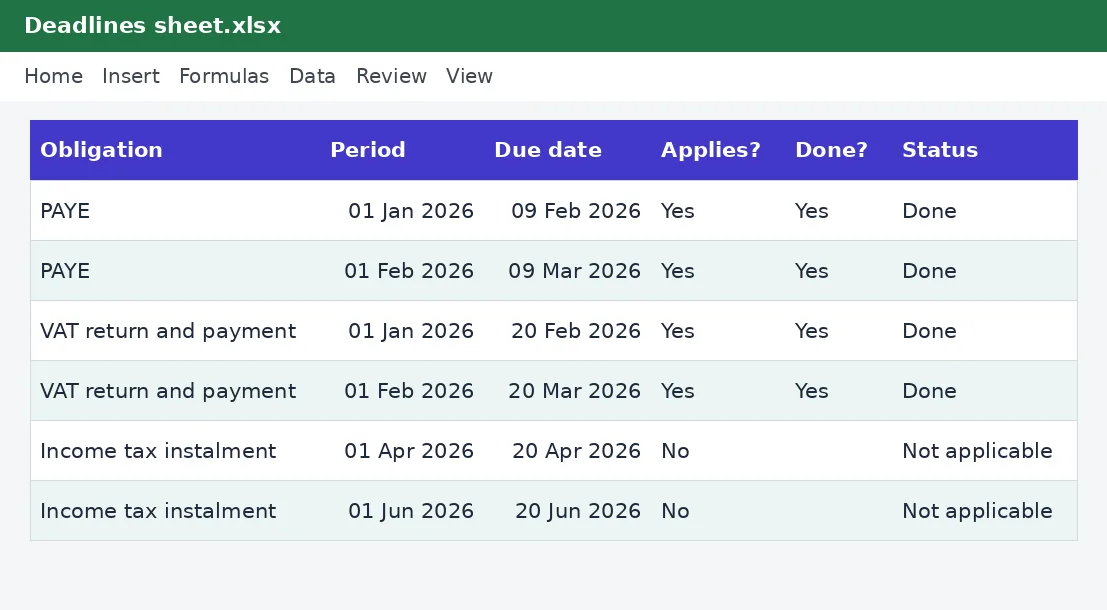
- Enter the year on Deadlines.
- Type Yes in the Done column as you file and pay.
- Filter by Status to see what is overdue.
Rates and thresholds
Edit the due days on the Setup sheet if a deadline changes.
Templates are tools to help with your own records. They are not tax or legal advice. Check the figures against official sources before filing or paying.
Advertisement
More in this category
-
 Taxpdf
Tax audit survival guide
What to do when KRA announces an audit: the types, your rights, the documents to prepare and how to respond.
KES 1,080KES 1,200-10%
View details →
-
 Taxpdf
Rental income tax guide for landlords
Monthly rental tax or annual return? How landlords register, file, pay and keep records, with a worked example.
KES 720KES 800-10%
View details →
-
 Taxpdf
Withholding tax guide for Kenyan businesses
Who must withhold tax, on which payments, at what rates, and how to remit, issue certificates and keep records.
KES 720KES 800-10%
View details →
The deadline you did not know about is the one that costs you
Most tax penalties are not the result of evasion. They come from an ordinary business owner who was busy, did not know a date, or assumed somebody else had it covered. Kenya's tax calendar is busy: payroll payments on the 9th, VAT, turnover tax, rental income tax and withholding tax on the 20th, instalments four times a year, and annual returns in February and June. This calendar turns all of that into a single list for your year, shows only what applies to you, and tells you in plain words what is overdue and how many days are left.
Which obligations the calendar covers
- Payroll payments (PAYE, then NSSF, SHIF and the Housing Levy), generally due by the 9th of the month after payroll.
- VAT returns and payments, generally due by the 20th of the month after the sales.
- Turnover tax, monthly rental income tax and withholding tax, each generally due by the 20th of the following month.
- Income tax instalments, generally due on the 20th of the fourth, sixth, ninth and twelfth months of the year.
- The individual income tax return, due by 30 June after the year end.
- The employer's annual return, due at the end of February after the year.
- The company income tax return, due six months after the company's year end.
Setting it up in two minutes
On the Setup sheet each obligation has a Yes or No box: say which ones apply to you. A landlord on monthly rental income tax needs only that one and the annual return. A shop owner with staff needs payroll, turnover tax or VAT, and withholding tax if they pay suppliers. A company needs all of them plus the company return. Enter your year on the Deadlines sheet and, for a company, its year-end date. The calendar then builds the dates: ninety-odd rows with the due date, whether it applies to you, a Done box and a status.
How the status works
If an obligation does not apply to you, the status says Not applicable and you can filter it out. If you typed Yes in the Done column, it says Done. Otherwise the calendar compares the due date with today: a past date reads OVERDUE in red, and a future date reads Due in a number of days. The count at the top of the sheet tells you how many are overdue right now.
Using the filter buttons
Every heading on the Deadlines sheet has a filter arrow. Choose Applies? equals Yes to hide everything that is not yours, then filter Status to see only what is overdue, or sort by Due date to see what is coming next. Do this on the first working day of every month, and again on the 5th.
What lateness costs
Late filing and late payment attract penalties and interest, and they add up. For an individual income tax return, the late filing penalty is currently 5% of the tax due, with a minimum of KES 2,000, and there are further charges for late payment and interest on unpaid tax every month. Our KRA penalty calculator works out the cost for a specific case. Filing on time, even when you cannot pay in full, almost always reduces the total, because the filing penalty is avoided. Our guide to the 30 June tax deadline explains who must file.
Weekends, holidays and changes
A due date that falls on a weekend or a public holiday may be treated differently, and the Finance Act changes dates and rates from time to time. The calendar uses the usual due days and lets you edit each one on the Setup sheet. Always confirm a date on the Kenya Revenue Authority website before relying on it for something important, and set the real date in your own phone calendar as well. If you have not filed a return in a month with no activity, our guide to nil returns explains what to file.
Habits that keep you out of trouble
- Review the calendar at the start of each month and again mid-month.
- File early rather than on the last day: the iTax system is slowest on deadline day.
- Pay as soon as you file, and record the payment in your tax payments log.
- Keep the acknowledgement for every return and the receipt for every payment.
- If you are going to be late, file anyway and pay what you can.
This calendar is a reminder tool and not tax advice. The due days have not yet been verified by KenyaTax for the period, and which obligations apply to you depends on your circumstances. If you are unsure, ask a tax adviser.
Related guides, calculators and templates
- Free calculator: KRA Late Filing Penalty and Interest Calculator
- Guide: Bank reconciliation step by step: match your books to your bank
- Guide: KRA penalties and interest explained: what late filing and payment cost
- Guide: The Affordable Housing Levy explained for employees and employers
- Another template: Annual income tax estimator
- Another template: Instalment tax planner
- Another template: MRI versus annual rental tax comparison
Need something different? Request a custom template, browse all guides or see every Excel template.
Scroll inside the box to read more.