Multi-location sales tracker
Record sales for up to ten shops or locations month by month and compare them against targets.

A business with several shops needs one view of how each is doing. Record each location's sales and target for each month, and the tracker works out the achievement, the totals by location and by month and shows which locations are ahead and which are behind.
Owners and area managers of businesses with several shops, branches or stalls.
What is included
- Targets and sales by location and month
- Achievement percentage and status
- Totals at the top
- Summary by location with a chart
- Room for 600 lines
Advertisement
Screenshots
How to use it
- List the locations in the dropdown on the Sales sheet.
- Record each location's target and actual sales for each month.
- Read the achievement and the status for each line.
- Use the summary to compare the locations.
Templates are tools to help with your own records. They are not tax or legal advice. Check the figures against official sources before filing or paying.
Advertisement
More in this category
-
 Businesspdf
Small business funding guide for Kenya
The main ways Kenyan small businesses raise money: savings, loans, SACCOs, mobile lenders, grants and investors.
KES 720KES 800-10%
View details →
-
 Businesspdf
SOP writing guide and templates
How to write standard operating procedures that people actually use, with templates for a process, a checklist and a training record.
KES 810KES 900-10%
View details →
-
 Businesspdf
Sales proposal and quotation pack
Win more work with a clear proposal, a professional quotation and a follow-up letter, with a checklist for each step.
KES 630KES 700-10%
View details →
What the multi-location sales tracker does
A business with several shops needs one view of how each is doing. Record each location's sales and target for each month, and the tracker works out the achievement, the totals by location and by month and shows which locations are ahead and which are behind.
Who it is for
Owners and area managers of businesses with several shops, branches or stalls.
How to use the workbook
- List the locations in the dropdown on the Sales sheet.
- Record each location's target and actual sales for each month.
- Read the achievement and the status for each line.
- Use the summary to compare the locations.
- Save a copy under a new name for each month or year, so earlier records stay as they were.
What is inside
- Targets and sales by location and month
- Achievement percentage and status
- Totals at the top
- Summary by location with a chart
- Room for 600 lines
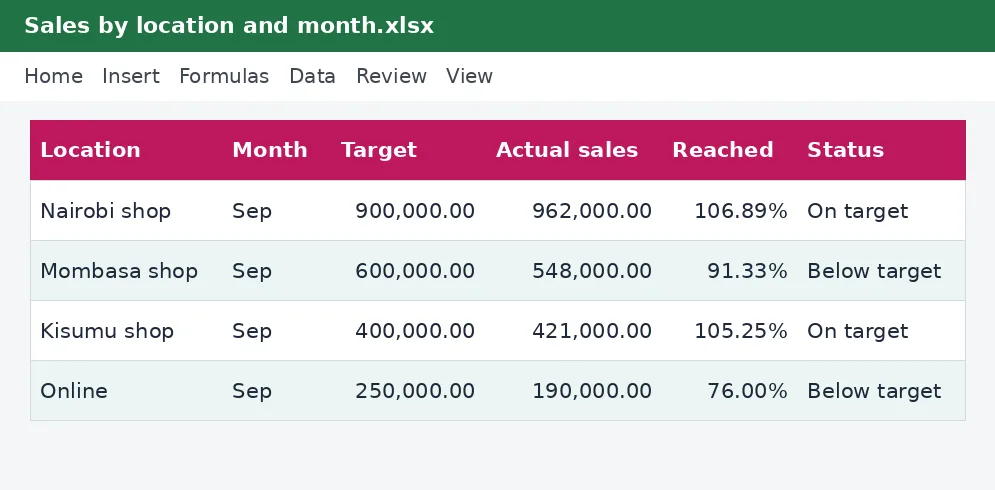
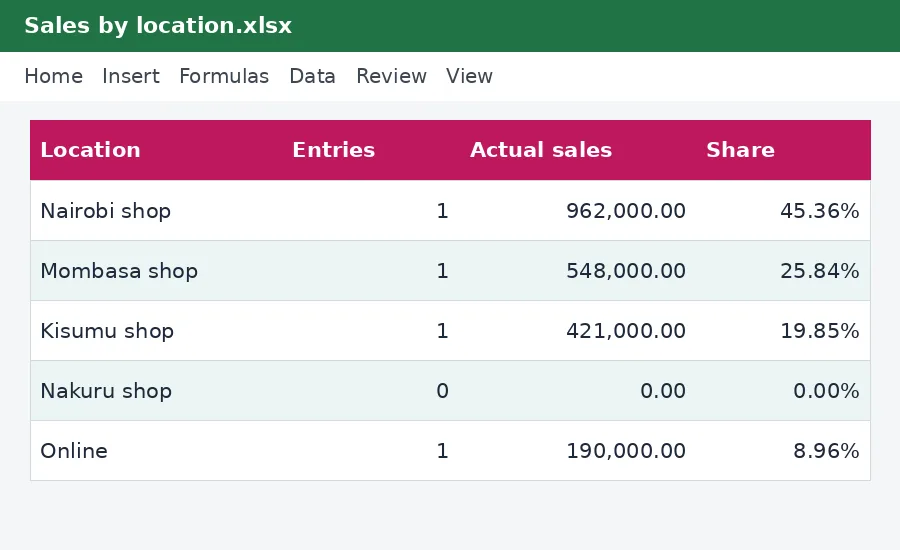
The workbook has these sheets: Instructions, Sales, By location. The main table has the columns Location; Month; Target; Actual sales; Reached; Status. Yellow cells are for you to fill in and grey cells calculate by themselves, so leave the grey cells alone. The example rows show how it works; type over them with your own entries.
Tips for getting it right
- Set targets for each location from its own history.
- Compare locations that are alike.
- Talk to the managers of locations that fall behind.
- Review the totals each month.
Why keep this record
Running a business on memory works until it grows. Writing the numbers down turns opinions into facts you can compare month to month, and shows early which products, customers or costs deserve attention. Even a simple workbook, used every week, usually beats a sophisticated one that is opened once a year.
Questions people ask
Do I need to know Excel formulas? No. Type into the yellow cells and the rest is worked out for you. The formulas are visible if you want to see how a figure is reached.
Can I add rows or change the layout? You can add your own columns to the right and your own notes. If you insert rows inside a table, copy the grey formula cells down so the new rows calculate too.
Will it work on my phone or in Google Sheets? Yes for viewing and typing, but dropdown lists and the charts look best in desktop Excel or LibreOffice.
Keeping it safe and up to date
A plan is only as good as the numbers you put in. Start with honest estimates, update the workbook as real figures arrive, and compare the two so your next estimate is better. Save a dated copy each month so you can see how your thinking changed.
Read how to build a cash flow forecast for the wider picture. Free calculators that go with it: Turnover tax calculator. See more business templates or ask us for a custom one.
The workbook works in Microsoft Excel, LibreOffice and Google Sheets. It is a tool to help you work out and record figures, not tax, legal or accounting advice, and it is not affiliated with the Kenya Revenue Authority. If something does not work as described, contact us and we will put it right.
Related guides, calculators and templates
- Free calculator: Turnover Tax Calculator
- Guide: How to set up an M-Pesa till or Paybill for your business and account for it
- Guide: Tax on selling personal items and second-hand goods online
- Guide: How to protect your business from fraud and theft
- Another template: Monthly sales target tracker
- Another template: Seasonal sales and stock planner
- Another template: 12-month cash flow forecast
Need something different? Request a custom template, browse all guides or see every Excel template.
Scroll inside the box to read more.