Petty cash book (imprest)
Run petty cash with a fixed float, a voucher for every payment, a running balance and a cash count that shows at once if anything is missing.

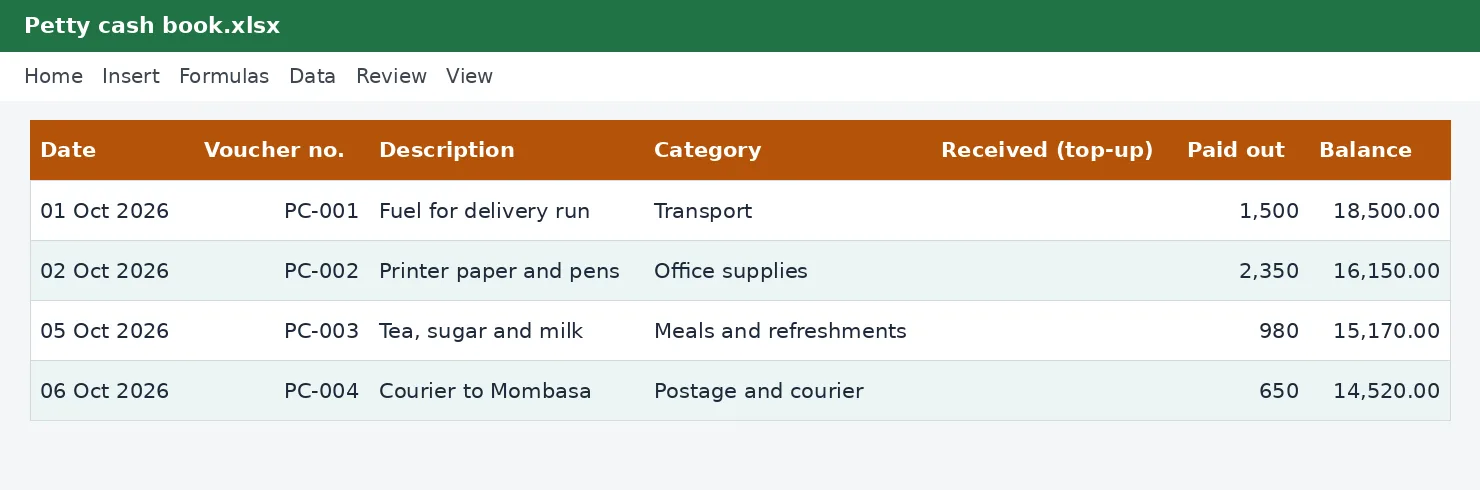
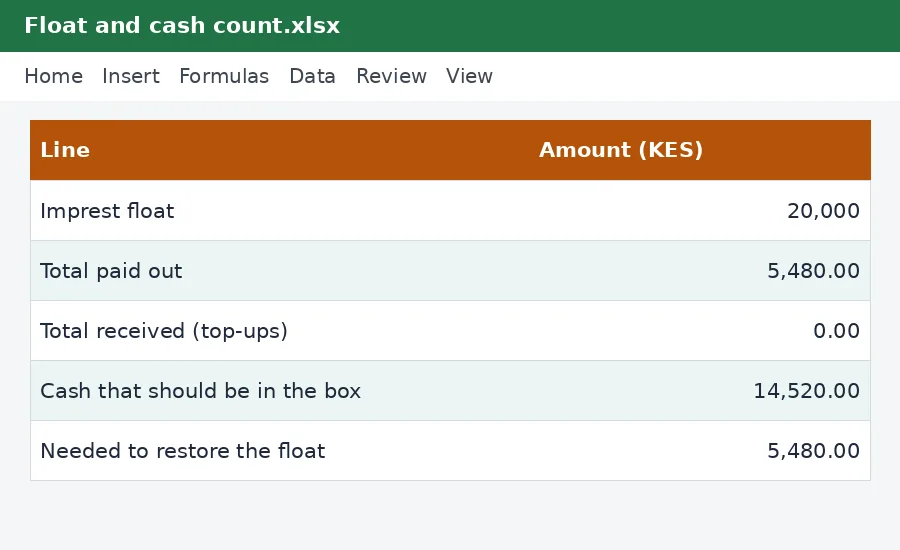
Petty cash goes missing in small amounts. This workbook runs it the imprest way: a fixed float, a numbered voucher for every payment, a balance that is always known, and a cash count sheet that compares the notes and coins in the box with what the book says should be there. It also shows how much to reimburse to restore the float.
What is included
- Float, paid out and cash that should be in the box
- Voucher numbers, categories and approver for each payment
- Cash count by denomination with over and short
- Amount needed to restore the float
- Spending by category
Advertisement
Screenshots
How to use it
- Enter the float.
- Record each payment with its voucher number.
- Count the cash on the Cash count sheet.
- Reimburse the amount shown to restore the float.
Templates are tools to help with your own records. They are not tax or legal advice. Check the figures against official sources before filing or paying.
Advertisement
More in this category
-
 Accountingpdf
Credit control policy and collection letters
A credit policy and four collection letters, from a friendly reminder to a final demand, to get paid on time.
KES 810KES 900-10%
View details →
-
 Accountingpdf
Audit preparation guide for small businesses
How to prepare for an annual audit: documents, schedules, timeline and what the auditor will ask.
KES 900KES 1,000-10%
View details →
-
 Accountingpdf
Internal controls checklist for small businesses
A practical checklist of controls that protect a small business from error and fraud: cash, sales, purchases and payroll.
KES 720KES 800-10%
View details →
Small amounts, big leaks
Almost every business keeps a little cash for tea, fuel, stationery, courier fees and the hundred small things that cannot wait for a cheque. Almost every business also finds, sooner or later, that the cash box is short and nobody can say why. Petty cash goes wrong because it is small: nobody wants to write a voucher for a KES 200 purchase, so nobody does. The imprest system is the simple cure. This free workbook runs it for you.
What the imprest system means
An imprest is a fixed float. You give the cashier, for example, KES 20,000. Every time they pay something, they write a voucher. At any moment the cash in the box plus the vouchers must equal the float. When the cash runs low, you reimburse the cashier exactly the total of the vouchers, which restores the float, and the cycle starts again. Because the float never changes, the books and the box can always be compared, and any difference is immediately a question to answer.
- Float: the fixed amount you start and restart with.
- Vouchers: a numbered record of every payment, with the date, what it was for and who approved it.
- Cash that should be in the box: float plus any top-ups, minus everything paid out.
- Reimbursement: the amount needed to bring the box back up to the float.
How the workbook works
- Type the float and the name of the custodian at the top of the Petty cash sheet.
- For each payment, add a row: date, voucher number, description, category and amount paid. A drop-down list of categories keeps the data tidy, and a column records who approved it.
- The balance after each row, and the cash that should be in the box, update by themselves.
- When you count the cash, enter the number of notes and coins of each denomination on the Cash count sheet. It adds them up, compares them with the book and says whether the box is over, short or exactly right.
- When you reimburse the cashier, the amount shown under Needed to restore the float is what you hand over.
The cash count
The Cash count sheet lists the Kenyan notes and coins from KES 1,000 down to KES 1. Type how many of each you have. If a voucher has not yet been entered, put its value in the line provided. The sheet then shows the difference between what you counted and what the book says. A difference of zero is the goal. A small shortage that appears every month is a warning that change is being given wrongly or purchases are not being recorded. A large one needs an explanation the same day.
Rules that make petty cash safe
- One person is responsible for the box, and it is kept locked.
- No voucher, no cash. Never accept an IOU or a note in place of a receipt.
- Someone other than the cashier approves each voucher.
- Set a limit for a single petty cash payment. Larger purchases go through the normal process.
- Count the cash without warning from time to time, and at least once a month.
- Keep the box separate from personal money and from sales takings.
Petty cash and tax
Petty cash payments are business expenses, and like other expenses they need evidence if you want to claim them. Ask for a receipt for every purchase, and where the supplier is required to issue an electronic tax invoice, ask for that: our guide to eTIMS e-invoicing explains why. Staple the receipt to the voucher, write the voucher number on it and keep both for at least five years. The category totals on the By category sheet feed straight into your expense records, and our VAT calculator will split the VAT out of a receipt if you are registered.
When it is time to change the float
If you are topping up the float every week, it is too small. If most of the money never moves, it is too big, and a large float is an invitation to theft. Review the spending by category every quarter and set the float to cover about two to four weeks of normal spending.
This workbook is a record-keeping tool and not accounting or tax advice. For guidance on keeping records, see the Kenya Revenue Authority, and speak to your accountant if your cash handling is more complex than a small float.
Related guides, calculators and templates
- Guide: How to keep business records for KRA: what to save and for how long
- Guide: Bank reconciliation step by step: match your books to your bank
- Guide: Fixed assets and capital allowances explained for small businesses
- Another template: Bank reconciliation statement
- Another template: Customer invoices and aged receivables tracker
- Another template: Expense tracker with VAT
Need something different? Request a custom template, browse all guides or see every Excel template.
Scroll inside the box to read more.