Sick leave and absence tracker
Record every absence with dates, type and whether a doctor's note was shown, and see the days taken by type.

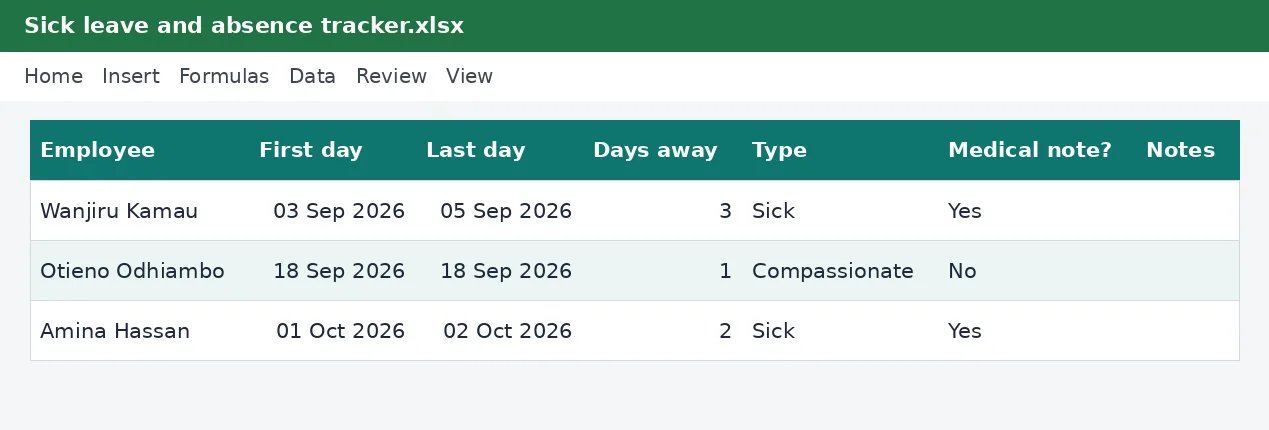
Absence is easy to forget and hard to prove later. This tracker records each absence with the first and last day, works out the number of days, notes the type and whether a medical note was provided, and totals the days by type so you can see how much sickness, compassionate leave and unpaid leave there has been.
Employers, HR officers and office managers who want a simple record of absences to support payroll decisions and leave balances, without a full HR system.
What is included
- First day, last day and days away worked out
- Type of absence from a dropdown
- Medical note recorded as yes or no
- Total days at the top
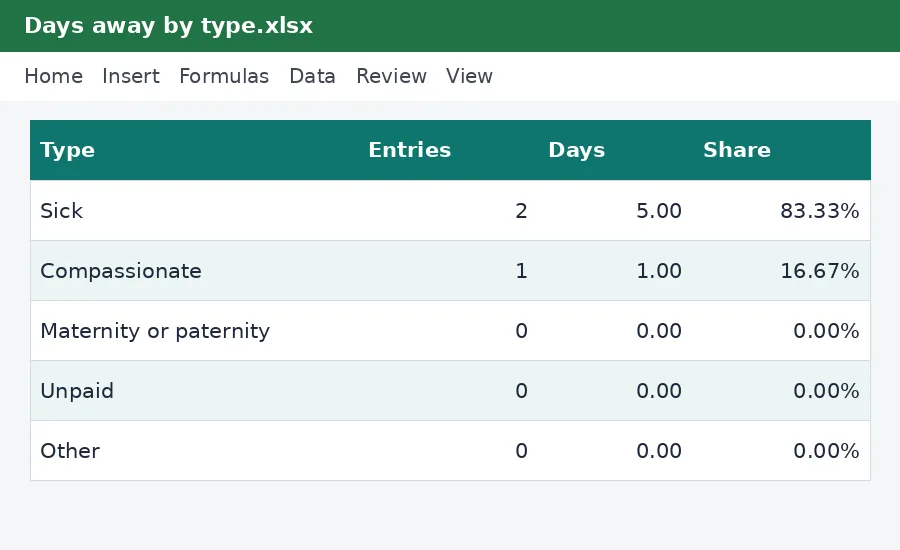
- Summary with a chart by type
Advertisement
Screenshots
How to use it
- Enter the employee and the first and last day of the absence.
- Choose the type of absence and whether a note was provided.
- Read the days calculated for each absence.
- Open the Summary sheet to see the days by type.
Templates are tools to help with your own records. They are not tax or legal advice. Check the figures against official sources before filing or paying.
Advertisement
More in this category
-
 Payrollpdf
Payroll policy and procedures manual
A written payroll manual: roles, monthly timetable, calculations, approvals, payment, remittances and record keeping.
KES 1,080KES 1,200-10%
View details →
-
 Payrollpdf
Leave policy template for Kenyan employers
A complete leave policy covering annual, sick, maternity, paternity, compassionate and study leave, with how to apply.
KES 540KES 600-10%
View details →
-
 Payrollpdf
Termination and redundancy guide with letters
How to end employment lawfully in Kenya: notice, final dues, redundancy steps and the letters you will need.
KES 900KES 1,000-10%
View details →
What the sick leave and absence tracker does
Absence is easy to forget and hard to prove later. This tracker records each absence with the first and last day, works out the number of days, notes the type and whether a medical note was provided, and totals the days by type so you can see how much sickness, compassionate leave and unpaid leave there has been.
Who it is for
Employers, HR officers and office managers who want a simple record of absences to support payroll decisions and leave balances, without a full HR system.
How to use the workbook
- Enter the employee and the first and last day of the absence.
- Choose the type of absence and whether a note was provided.
- Read the days calculated for each absence.
- Open the Summary sheet to see the days by type.
- Save a copy under a new name for each month or year, so earlier records stay as they were.
What is inside
- First day, last day and days away worked out
- Type of absence from a dropdown
- Medical note recorded as yes or no
- Total days at the top
- Summary with a chart by type
The workbook has these sheets: Instructions, Absences, Summary. The main table has the columns Employee; First day; Last day; Days away; Type; Medical note?; Notes. Yellow cells are for you to fill in and grey cells calculate by themselves, so leave the grey cells alone. The example rows show how it works; type over them with your own entries.
Tips for getting it right
- Check your contracts and the Employment Act for the sick leave you owe.
- Ask for the note when the policy says so and record that you received it.
- Count calendar days or working days, but use the same rule every time.
- Review repeat absences kindly and early.
Why keep this record
Staff records go wrong in small, repeated ways: a figure typed twice, a deadline forgotten, a promise that nobody wrote down. A tidy workbook that everyone uses the same way removes most of those problems. It also gives you something to show an employee, an auditor or a labour officer when a question comes up months later, and it makes the next payroll quicker because the facts are already in one place.
Questions people ask
Do I need to know Excel formulas? No. Type into the yellow cells and the rest is worked out for you. The formulas are visible if you want to see how a figure is reached.
Can I add rows or change the layout? You can add your own columns to the right and your own notes. If you insert rows inside a table, copy the grey formula cells down so the new rows calculate too.
Will it work on my phone or in Google Sheets? Yes for viewing and typing, but dropdown lists and the charts look best in desktop Excel or LibreOffice.
Keeping it safe and up to date
Payroll records are personal data and tax records at once, so keep the file somewhere only the people who need it can open, and keep each month's copy for at least five years. Statutory rates such as NSSF limits and the Housing Levy change, so check the Rates sheet against the official source before you rely on a figure.
Read how to run payroll for a small business for the wider picture. See more payroll templates or ask us for a custom one.
The workbook works in Microsoft Excel, LibreOffice and Google Sheets. It is a tool to help you work out and record figures, not tax, legal or accounting advice, and it is not affiliated with the Kenya Revenue Authority. If something does not work as described, contact us and we will put it right.
Related guides, calculators and templates
- Guide: How to run payroll for a small business in Kenya
- Guide: How PAYE is calculated in Kenya, step by step
- Guide: NSSF contributions explained: tiers, limits and what you pay
- Another template: Annual PAYE and payroll summary
- Another template: Annual leave planner and register
- Another template: Benefits and allowances register
Need something different? Request a custom template, browse all guides or see every Excel template.
Scroll inside the box to read more.