Annual PAYE and payroll summary
Keep month-by-month totals of gross pay, PAYE, NSSF, SHIF and Housing Levy, and what you paid KRA, with year totals.

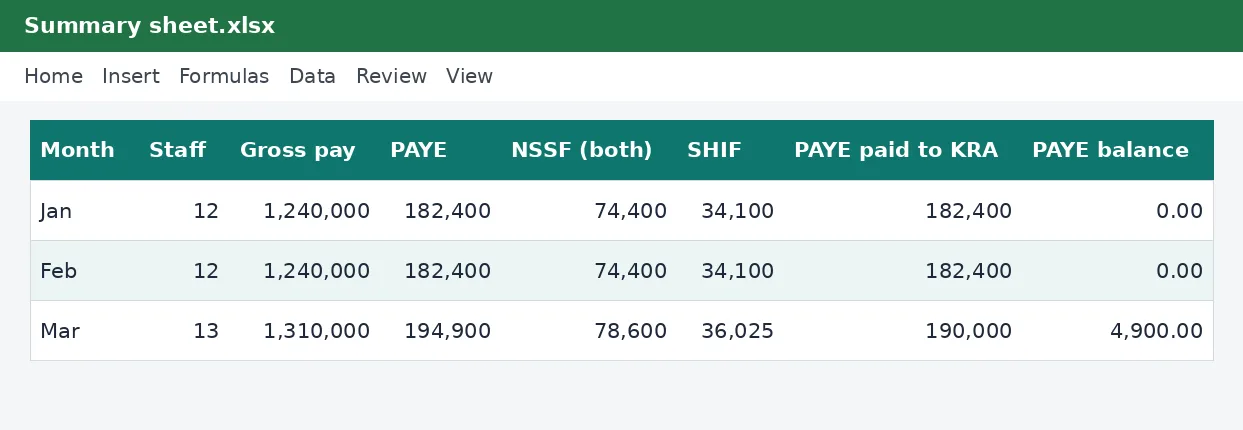
Your year of payroll on one page. Copy each month's totals from your payroll, record the date and amount you paid KRA, and see any month where what you paid does not match what you owed. The annual totals are ready for your employer's annual return and your own records.
What is included
- Twelve months on one sheet
- PAYE paid against PAYE owed, with a balance for each month
- Annual totals and averages
Advertisement
Screenshots
How to use it
- At month end, copy your payroll totals into that month's row.
- Record the payment to KRA.
- Check the Balance column.
Templates are tools to help with your own records. They are not tax or legal advice. Check the figures against official sources before filing or paying.
Advertisement
More in this category
-
 Payrollpdf
Payroll policy and procedures manual
A written payroll manual: roles, monthly timetable, calculations, approvals, payment, remittances and record keeping.
KES 1,080KES 1,200-10%
View details →
-
 Payrollpdf
Leave policy template for Kenyan employers
A complete leave policy covering annual, sick, maternity, paternity, compassionate and study leave, with how to apply.
KES 540KES 600-10%
View details →
-
 Payrollpdf
Termination and redundancy guide with letters
How to end employment lawfully in Kenya: notice, final dues, redundancy steps and the letters you will need.
KES 900KES 1,000-10%
View details →
See your whole payroll year on one page
Payroll is a monthly job, but the questions that matter often come at the end of the year. How much PAYE did we deduct and how much did we pay? Did every month's payment match what we owed? What was our total wage bill, and what share of it went to tax and contributions? This workbook is a year-long record of your payroll that answers those questions. Each month you copy in the totals from your payroll, record what you paid to the Kenya Revenue Authority and when, and the sheet shows the balance and the yearly totals.
What it records
There is one row for each month of the year with columns for the number of staff, gross pay, PAYE deducted, NSSF, SHIF, the Housing Levy, the net pay you paid out, the PAYE you paid to KRA, the date you paid it, and a balance. The balance simply compares what you deducted with what you paid. A zero means you are square. A positive figure means you owe KRA, and a negative one means you paid too much, which might be a mistake worth checking.
- Monthly totals for gross pay and every statutory deduction
- PAYE paid against PAYE owed, month by month
- The date of each PAYE payment, so you can see late months at a glance
- Yearly totals, average staff numbers and PAYE as a share of gross pay
Why a summary matters
Employers have to file a return of the PAYE they have deducted and paid. The annual figures you need for that return, and for your own accounts, are simply the sum of twelve months of payroll. If each month's totals have been recorded as you go, the year-end becomes a matter of checking the total and filing. If they have not, it becomes a scramble to rebuild twelve months from payslips. A summary also acts as an early warning: if one month's PAYE paid is lower than PAYE deducted, you will see it that month, not in a letter from KRA a year later.
How to use it through the year
- At the end of each month, finish your payroll, whether in the monthly payroll workbook or other software.
- Copy that month's totals into its row: staff, gross pay, PAYE, NSSF, SHIF, Housing Levy and net pay.
- Pay PAYE through iTax by the due date, which is generally the 9th day of the following month, and record the amount and the date.
- Look at the Balance column. Anything other than zero deserves a note or a correction.
- At year-end, read the totals row. Those are the figures for your annual employer return, and for the P9 forms your employees need.
Reading the ratios
The PAYE share of gross pay shows how much of your wage bill goes to income tax. It will drift up through the year as raises push staff into higher bands, and it will fall if you lose higher earners. The average staff figure helps you spot months when headcount changed. These are not tax calculations but management numbers, and they are useful when you budget for the next year.
Connecting it to the rest of your records
This summary pairs naturally with the employment return and P9 guide, which explains what employees do with their year-end certificates, and with the PAYE calculator when you need to check one person's figures. If your payroll is in the monthly workbook, its totals row is exactly what goes into this sheet each month. Keep each year's summary with your bank statements and KRA payment receipts, because together they are the evidence that your payroll taxes were paid, and tax records should be kept for at least five years.
A word on deadlines and accuracy
The employer's annual return is generally due shortly after the end of the tax year, and PAYE is due monthly. Dates and penalties can change, so confirm the current ones on the Kenya Revenue Authority website. This workbook is a record-keeping aid and is not tax advice. It does not file anything for you, and the figures in it are only as good as the totals you enter. If you are unsure about how a payment should be treated, or if your payroll includes benefits in kind and other special items, ask a tax adviser.
Related guides, calculators and templates
- Free calculator: PAYE Calculator
- Free calculator: Annual Tax Return Estimator (P9)
- Guide: NSSF contributions explained: tiers, limits and what you pay
- Guide: SHIF contributions explained: rate, minimum and who pays
- Guide: Tax for freelancers and content creators in Kenya: Upwork, YouTube and TikTok income
- Another template: Gross-to-net salary table
- Another template: Monthly payroll workbook (up to 50 employees)
- Another template: Payslip generator
Need something different? Request a custom template, browse all guides or see every Excel template.
Scroll inside the box to read more.