Annual leave planner and register
Record every leave, count only working days, and see each employee's balance and who is away each month.

A leave register that does the counting. List your employees, log each leave with its first and last day, and the workbook counts the working days (skipping weekends and the public holidays you enter), subtracts them from the entitlement and shows each person's balance. A monthly view shows who is away when.
What is included
- Working days counted for you, five or six-day week
- Public holidays excluded
- Balance and a low-balance flag for every employee
- Annual, sick, maternity, paternity and other leave types
- Monthly view of leave by employee
Advertisement
Screenshots
How to use it
- On the Rates sheet, set your working week and enter the year's public holidays.
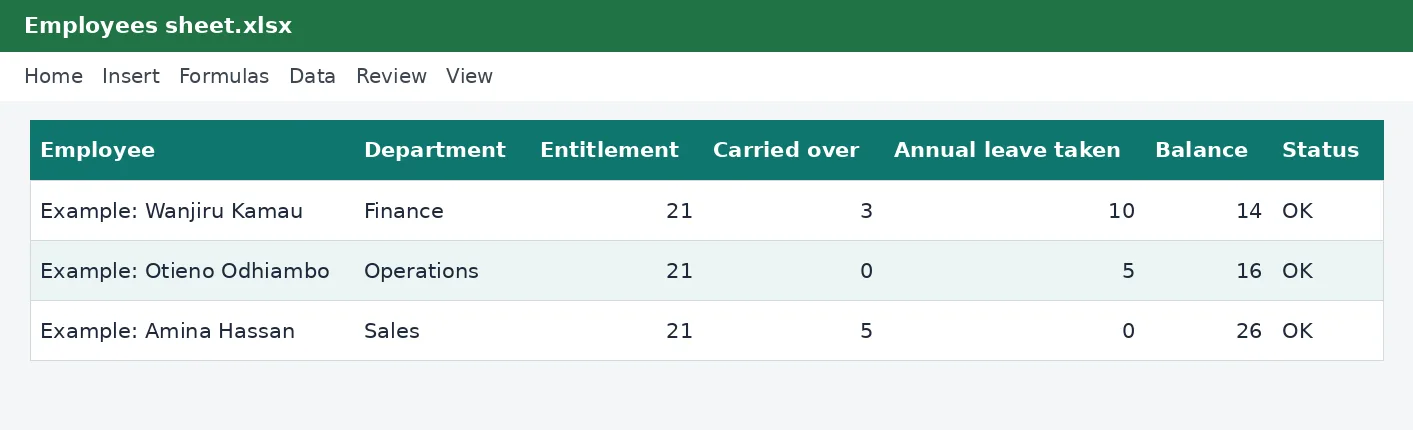
- List employees on the Employees sheet.
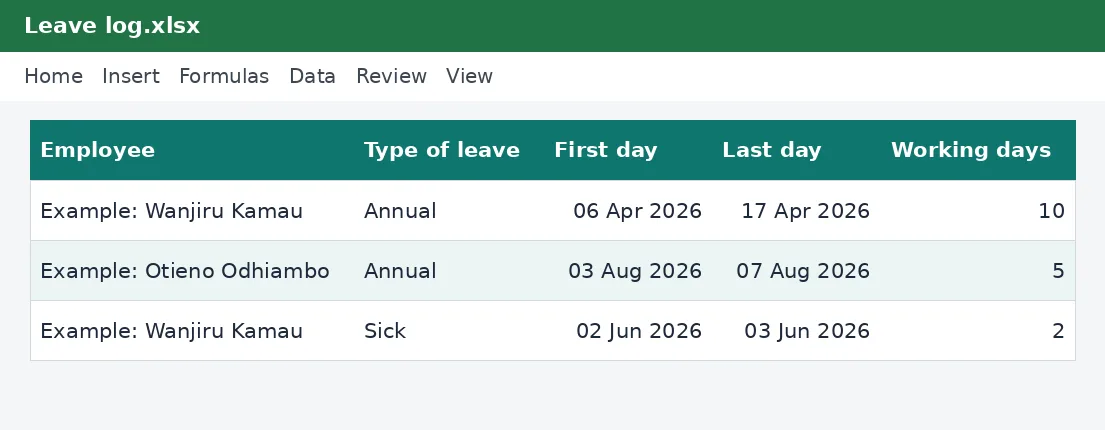
- Record each leave on the Leave log.
- Check balances and the monthly view.
Rates and thresholds
Edit leave days, the working week and the holiday list on the Rates sheet.
Templates are tools to help with your own records. They are not tax or legal advice. Check the figures against official sources before filing or paying.
Advertisement
More in this category
-
 Payrollpdf
Payroll policy and procedures manual
A written payroll manual: roles, monthly timetable, calculations, approvals, payment, remittances and record keeping.
KES 1,080KES 1,200-10%
View details →
-
 Payrollpdf
Leave policy template for Kenyan employers
A complete leave policy covering annual, sick, maternity, paternity, compassionate and study leave, with how to apply.
KES 540KES 600-10%
View details →
-
 Payrollpdf
Termination and redundancy guide with letters
How to end employment lawfully in Kenya: notice, final dues, redundancy steps and the letters you will need.
KES 900KES 1,000-10%
View details →
Leave is a right, and a record you must be able to produce
Annual leave sounds simple until an employee asks how many days they have left, someone resigns with leave owing, or two people want the same week. Then it turns out that the answer is in a notebook, an email thread and somebody's memory. This free planner keeps one clear record of every leave, counts the working days properly, and shows each employee's balance and who is away each month. It saves time, avoids disputes and gives you something to show if you are ever asked.
What the law says in broad terms
The Employment Act gives employees a minimum of paid annual leave, which the planner sets at 21 working days a year. In practice leave builds up over the year, and a common way to work out the entitlement for part of a year is to count it month by month. Sick leave, maternity leave, paternity leave and compassionate leave are separate entitlements with their own rules, and your contract or a collective agreement may give more than the legal minimum. The planner lets you record every kind of leave, but only annual leave is deducted from the annual balance.
- Annual leave is counted against the yearly entitlement and any days carried over.
- Sick, maternity, paternity, compassionate and study leave are recorded but do not reduce the annual balance.
- Unpaid leave is recorded so you can adjust pay, and is left out of the monthly view.
How the counting works
You enter the first and last day of each leave. The workbook counts the working days between them, which means it skips weekends and any public holidays you have typed on the Rates sheet. You choose whether your working week is five or six days, because many Kenyan businesses work Monday to Saturday, and the count follows your choice. Public holidays change from year to year and can be added by proclamation, so the planner does not guess: you list them once a year and they are excluded from every leave.
Check how holidays within a leave are treated
Whether a public holiday that falls inside a period of leave counts as a leave day depends on your contract and the law as it applies to you. The planner's default treatment is that holidays you list do not count against the balance, which is how most employers handle it. If your policy is different, leave the holiday list empty and the planner counts every working day.
Using the planner
- On the Rates sheet, check the leave entitlement, set the working week and type the public holidays for the year.
- On the Employees sheet, list each person and the days they carry over from last year, if your policy allows carry-over.
- On the Leave log, add a row for each leave: choose the employee and the type from the lists, and enter the first and last day.
- Read the Employees sheet. The balance is the entitlement plus carried-over days minus annual leave taken, with a flag when it is low or exceeded.
- Use the Monthly view to see how many leave days each person takes in each month, counted in the month the leave starts.
Planning cover and avoiding clashes
The monthly view is useful when you plan the year. If three people in the same department take leave in December, you will see it before the rush. Ask staff to submit their preferred leave periods early in the year, enter them as planned leave, and adjust before approving. Keep a note column for approvals and reasons, which the Leave log provides.
Leave and payroll
Annual leave is paid leave, so it does not change pay. Unpaid leave does, and the days you record here are what you need to calculate any deduction. When an employee leaves, the planner's balance tells you how many days to pay out, which you can value using our overtime pay calculator to work out a daily rate and the PAYE calculator to see the tax on the payout. Our guide to filing an employment return explains the year-end paperwork.
Keep the records
Employers should keep employment records, including leave records, for at least five years after the employment ends. Save a copy of the workbook at the end of every year, with the year in its name, and start the new year from a copy that carries over the balances.
This planner is a record-keeping tool and not legal advice. The Employment Act sets the minimum entitlements and your contract may give more, so check them with a labour officer, a lawyer or the relevant authorities before relying on the figures for a dispute.
Related guides, calculators and templates
- Free calculator: Overtime Pay Calculator
- Guide: How to run payroll for a small business in Kenya
- Guide: How PAYE is calculated in Kenya, step by step
- Guide: NSSF contributions explained: tiers, limits and what you pay
- Another template: Overtime and leave tracker
- Another template: Annual PAYE and payroll summary
- Another template: Employee records register and contract tracker
Need something different? Request a custom template, browse all guides or see every Excel template.
Scroll inside the box to read more.