Tax payments log
One record of every tax payment, with the payment reference and receipt number, and totals by type of tax and by month.

Keep every payment you make to KRA in one place: the date, the type of tax, the period it covers, the amount, the payment reference and the receipt number. The summary totals what you paid by type of tax and by month, which is what you need when you reconcile your accounts or answer a query.
What is included
- Room for 300 payments
- Tax type and payment method from lists
- Payment reference and receipt number columns
- Totals by type of tax for the year
- Month-by-month totals
Advertisement
Screenshots
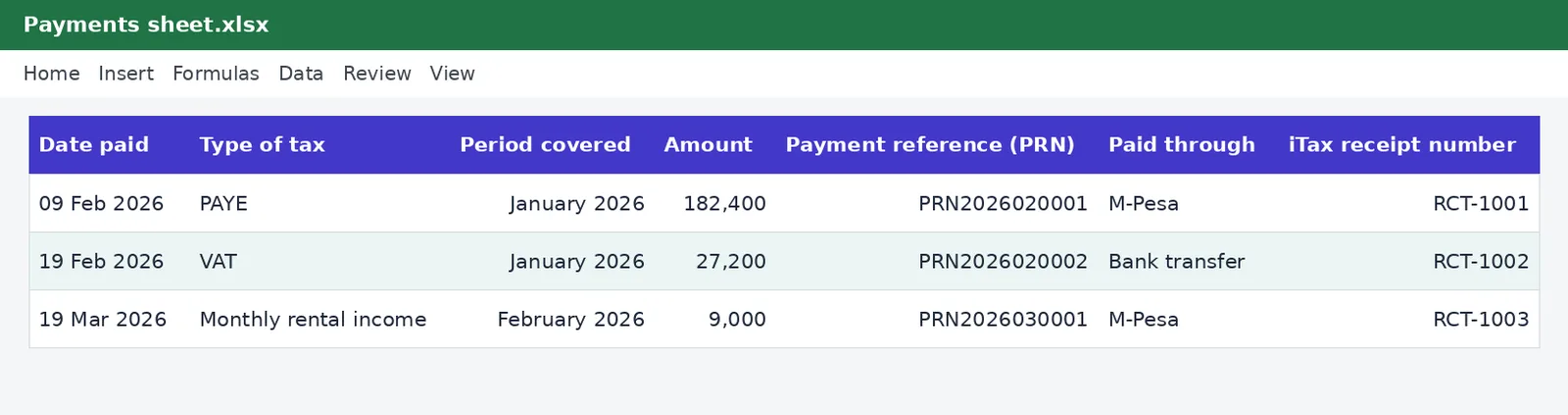
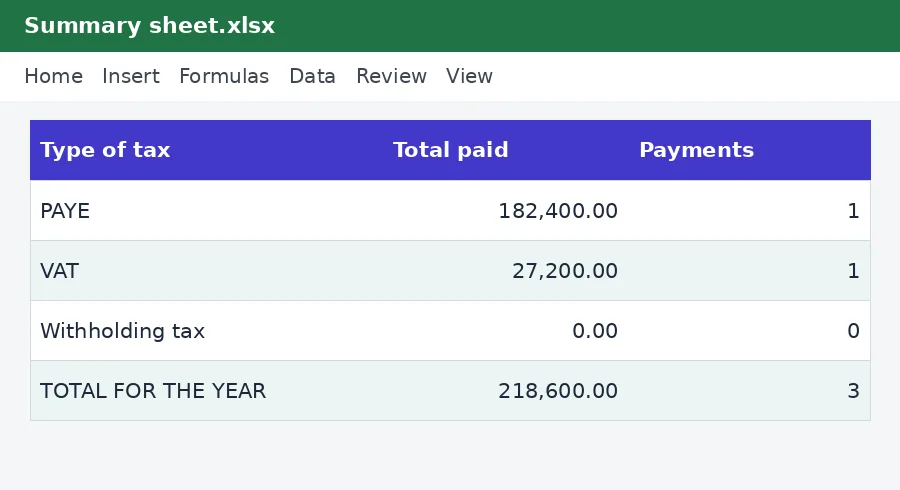
How to use it
- Enter the year on Summary.
- Add a row for each payment.
- Add the receipt number and keep the receipt.
- Read the totals.
Templates are tools to help with your own records. They are not tax or legal advice. Check the figures against official sources before filing or paying.
Advertisement
More in this category
-
 Taxpdf
Tax audit survival guide
What to do when KRA announces an audit: the types, your rights, the documents to prepare and how to respond.
KES 1,080KES 1,200-10%
View details →
-
 Taxpdf
Rental income tax guide for landlords
Monthly rental tax or annual return? How landlords register, file, pay and keep records, with a worked example.
KES 720KES 800-10%
View details →
-
 Taxpdf
Withholding tax guide for Kenyan businesses
Who must withhold tax, on which payments, at what rates, and how to remit, issue certificates and keep records.
KES 720KES 800-10%
View details →
The receipt you cannot find is the payment you cannot prove
Paying tax in Kenya is easier than it used to be: you generate a payment registration number on iTax, pay by M-Pesa or through your bank, and the system records it. But the record you rely on in a dispute or an audit is the one you can produce quickly: which payment, for which tax and period, on what date, with what reference. Most people keep that information scattered across SMS messages, bank statements and a downloads folder. This free log puts every payment on one line, with the numbers you will need, and adds up the totals for you.
What to record for each payment
- The date you paid, which is what counts against the due date.
- The type of tax, chosen from a list: PAYE, VAT, turnover tax, monthly rental income, withholding tax, instalments, income tax balance, corporation tax, excise and import duties, penalties and interest.
- The period it covers, such as January 2026 or Instalment 2.
- The amount.
- The payment registration number (PRN) generated on iTax, which links the payment to the liability.
- How you paid, and the receipt number once it appears on iTax.
The summary sheet
Enter the year once on the Summary sheet and the workbook totals what you paid for that year by type of tax, with the number of payments, then by month. That answers questions you will be asked at year-end: how much PAYE did we pay? How much VAT? Did we pay any penalties? Is this the same as our accounts? When the totals do not match your books, a difference of one payment is usually the cause, and the log helps you find it.
Penalties and interest get their own lines
Record penalties and interest separately from the tax. They are usually not deductible, and your accountant will need to treat them differently. Keeping them apart also shows you the real cost of paying late, which is often a useful lesson. Our KRA penalty calculator shows how those charges are built.
A simple routine
- Pay the tax through iTax and keep the payment confirmation.
- The same day, add a row to the log with the date, type, period, amount and PRN.
- When the receipt number appears, add it. Save the receipt as a PDF with the date and tax type in the file name.
- At the end of each month, compare the log's monthly total with your bank and M-Pesa statements.
- At year-end, give your accountant the Summary sheet and the folder of receipts.
Reconciling with your returns
The amounts in the log should match the amounts on your returns: PAYE paid against PAYE in the employer's return, VAT paid against VAT payable, and so on. If the payment is less than the return, the difference is a balance due, which attracts interest. If it is more, you may have overpaid, and the surplus may be credited or refunded. The log is the starting point for sorting that out. Our guide to registering on iTax shows where payments and receipts are found online.
When you pay for someone else
Accountants and bookkeepers often pay tax on behalf of clients. If you do, keep a separate copy of the log for each client, or add a client column using the Notes field, so that payments never get mixed up. Never pay under the wrong PIN: correcting a misallocated payment can take weeks.
How long to keep it
Keep the log and the receipts for at least five years after the end of the tax year. Back up the file, because it is the index to everything else. Our guide to the 30 June deadline and the filing calendar in this collection pair well with it: the calendar says when, and the log says what was done.
This workbook is a record-keeping aid and not tax advice. The payment details come from you, and the log does not connect to iTax or check anything with the Kenya Revenue Authority. Confirm the status of any payment on the official portal.
Related guides, calculators and templates
- Guide: The KRA filing calendar for small businesses: every monthly and yearly deadline
- Guide: KRA penalties and interest explained: what late filing and payment cost
- Guide: How to keep business records for KRA: what to save and for how long
- Another template: Annual income tax estimator
- Another template: Instalment tax planner
- Another template: KRA filing and payment calendar
Need something different? Request a custom template, browse all guides or see every Excel template.
Scroll inside the box to read more.