Withholding tax schedule
Work out the tax to withhold on each payment to a supplier, the net to pay them, and the total you owe KRA.

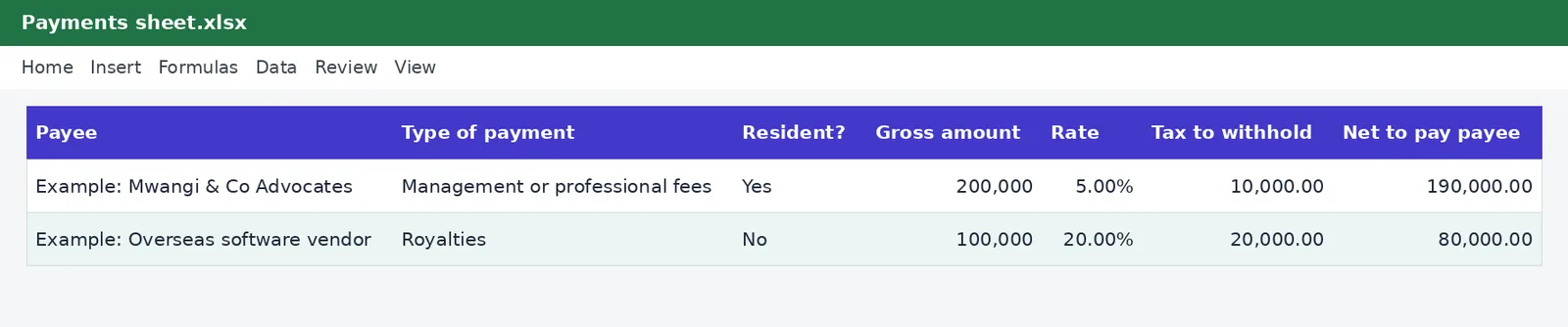
Record each payment to a supplier, landlord or professional, choose the type of payment and whether they are resident, and the tax to withhold and the net payable are calculated. The Summary sheet totals the tax by type of payment.
What is included
- Rates for each type of payment, resident and non-resident
- Tax withheld and net to pay for every payment
- Summary by type of payment
Advertisement
Screenshots
How to use it
- Check the rates on the Rates sheet.
- Record each payment.
- Pay the tax shown on the Summary sheet.
Rates and thresholds
Edit the rate table on the Rates sheet when rates change.
Templates are tools to help with your own records. They are not tax or legal advice. Check the figures against official sources before filing or paying.
Advertisement
More in this category
-
 Taxpdf
Tax audit survival guide
What to do when KRA announces an audit: the types, your rights, the documents to prepare and how to respond.
KES 1,080KES 1,200-10%
View details →
-
 Taxpdf
Rental income tax guide for landlords
Monthly rental tax or annual return? How landlords register, file, pay and keep records, with a worked example.
KES 720KES 800-10%
View details →
-
 Taxpdf
Withholding tax guide for Kenyan businesses
Who must withhold tax, on which payments, at what rates, and how to remit, issue certificates and keep records.
KES 720KES 800-10%
View details →
Deducting withholding tax correctly, and proving that you did
Withholding tax is one of those obligations that catches businesses by surprise. When you pay certain suppliers, such as consultants, contractors, landlords or foreign vendors, the law may require you to keep back a percentage of the payment and send it to the Kenya Revenue Authority on the supplier's behalf. If you do not, the tax can be charged to you, with penalties. This schedule keeps a record of each payment, works out the tax to withhold using the right rate for the type of payment, and totals what you owe KRA.
How withholding tax works
The principle is simple. You owe your supplier a gross amount. You deduct the withholding tax, pay the supplier the net amount, and pay the deducted tax to KRA, usually by the 20th of the month after the payment. The supplier then claims the tax you withheld as a credit against their own income tax, supported by the certificate you give them. The rate depends on the kind of payment and on whether the supplier is a resident or a non-resident. Rates for management and professional fees, contractual fees, commissions, royalties, interest and dividends differ, and non-residents are generally charged more.
- Type of payment decides the rate: fees, contracts, commissions, royalties and so on.
- Residence of the payee matters: resident and non-resident rates are different.
- Rent to a landlord has its own rates, and our withholding tax on rent calculator covers it.
How the schedule works
The Rates sheet holds a table of payment types with a resident and a non-resident rate for each. On the Payments sheet, you enter the date, the payee, the type of payment from a dropdown, whether they are resident, and the gross amount. The sheet looks up the rate, calculates the tax to withhold and the net amount you pay the supplier. The Summary sheet totals gross payments and tax withheld by type of payment, which is exactly what you need when you file and pay.
An example
You pay a law firm KES 200,000 for professional services. The sheet applies the resident rate for professional fees, shows the tax to withhold, and shows the smaller net amount you pay the firm. You pay a foreign software vendor KES 100,000 in royalties, and the sheet applies the non-resident rate, which is higher, so the vendor receives less in proportion. The example rows in the file show both cases, and the Summary sheet totals what you send to KRA.
A monthly routine
- Check the rates table on the Rates sheet against the official rates.
- Record every payment that might attract withholding tax as you make it.
- At month-end, read the Summary sheet for the total tax withheld.
- File the return and pay through iTax by the 20th of the following month.
- Give each supplier a withholding tax certificate, so they can claim their credit.
Where people go wrong
The most common mistakes are treating a payment as exempt without checking, using the resident rate for a non-resident, deducting the tax but forgetting to pay it over, and not keeping evidence. Some payments below a threshold are not subject to withholding, and some suppliers hold an exemption certificate, so always ask. If you are unsure whether a payment qualifies, a short question to a tax adviser costs far less than the tax and penalties. Our guides on registering on iTax and getting a KRA PIN help with the supplier side.
You can test a single payment with the withholding tax calculator and compare it to the schedule. This workbook records and calculates, and it is not tax advice. The rates in its table come from the KenyaTax rates table and have not yet been verified for the period, so confirm them with the Kenya Revenue Authority before filing.
Related guides, calculators and templates
- Free calculator: Withholding Tax Calculator
- Free calculator: Withholding Tax on Rent Calculator
- Guide: Withholding tax in Kenya explained: rates, agents and credits
- Guide: Monthly rental income tax or annual tax: which route is better for a landlord?
- Guide: How to file a Monthly Rental Income return
- Another template: Annual income tax estimator
- Another template: Instalment tax planner
- Another template: KRA filing and payment calendar
Need something different? Request a custom template, browse all guides or see every Excel template.
Scroll inside the box to read more.