Employee records register and contract tracker
Keep every employee's details and documents in one register, with warnings before contracts or probation periods end.

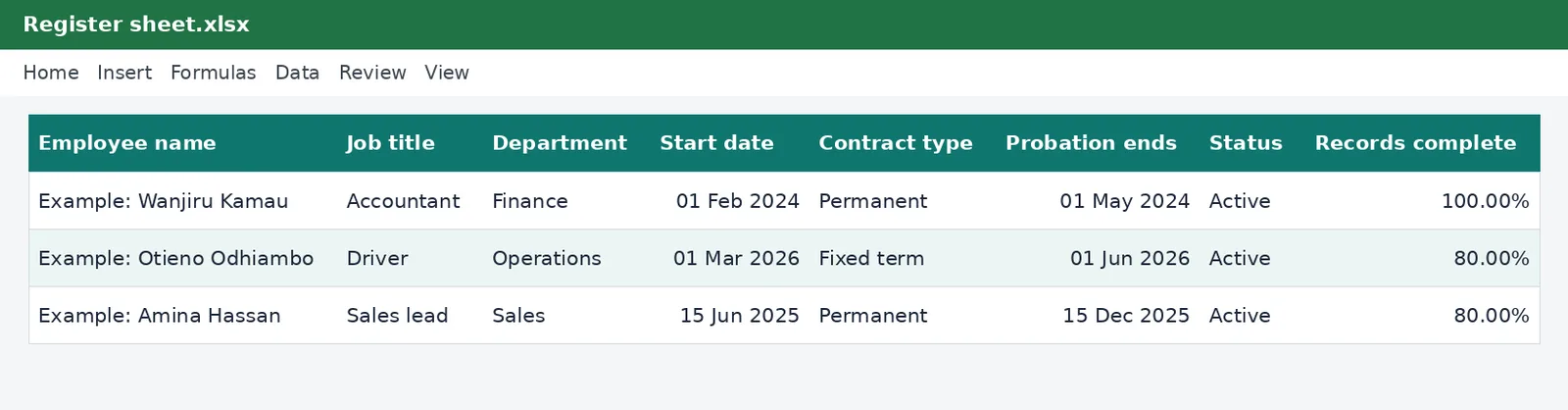
One register for your whole team: identity numbers, KRA PIN, NSSF and SHA numbers, job and department, start date, contract type and end date, probation, and a checklist of the documents you hold. It warns you when a contract or a probation period is about to end and shows which files are incomplete.
What is included
- Up to 100 employees
- Probation end date worked out from the start date
- Warnings for contracts and probation ending soon
- Document checklist with a records-complete percentage
- Summary by contract type
Advertisement
Screenshots
How to use it
- Set your warning periods on the Rates sheet.
- Add each employee on the Register sheet.
- Mark Yes for each document you hold.
- Check the Status column and the Summary sheet each week.
Templates are tools to help with your own records. They are not tax or legal advice. Check the figures against official sources before filing or paying.
Advertisement
More in this category
-
 Payrollpdf
Payroll policy and procedures manual
A written payroll manual: roles, monthly timetable, calculations, approvals, payment, remittances and record keeping.
KES 1,080KES 1,200-10%
View details →
-
 Payrollpdf
Leave policy template for Kenyan employers
A complete leave policy covering annual, sick, maternity, paternity, compassionate and study leave, with how to apply.
KES 540KES 600-10%
View details →
-
 Payrollpdf
Termination and redundancy guide with letters
How to end employment lawfully in Kenya: notice, final dues, redundancy steps and the letters you will need.
KES 900KES 1,000-10%
View details →
One register for everything you need to know about your team
Most small employers keep employee information in too many places: a folder of photocopies, a spreadsheet for payroll, messages with contract dates. Then a fixed-term contract quietly expires, a probation period passes without a decision, or an inspector asks for a staff list and half the details are missing. This register brings the essentials into one file, tells you when something needs attention, and shows at a glance which employee files are incomplete.
What the register holds
- Identity and statutory numbers: national ID, KRA PIN, NSSF number and SHA number, which you need for every payroll remittance.
- The job: title, department and start date.
- The contract: permanent, fixed term, casual or internship, with an end date for fixed-term contracts.
- Probation: the number of months, and the end date worked out from the start date.
- Documents held: signed contract, ID copy, KRA PIN certificate, NSSF and SHA registration, and bank details.
Warnings you will be glad of
The Status column reads each employee's dates against today's date and tells you where they stand: Active, On probation, Probation ending soon, Contract ending soon or Contract ended. You set how many days of warning you want on the Rates sheet. The Summary sheet counts how many contracts end soon and how many files are incomplete, so one glance each week tells you whom to deal with.
Probation and fixed-term contracts
The Employment Act limits a probationary period to six months, which can be extended once by agreement for up to a further period, so the dates matter. A decision made before the end of probation is easier and fairer than one made after. Fixed-term contracts end on their date without notice unless the contract says otherwise, and a contract that keeps being renewed can start to look like a permanent one. Seeing the end date coming gives you time to renew, convert or let it end properly, in writing.
How to set it up
- On the Rates sheet, choose how many days' warning you want before a contract or a probation period ends.
- On the Register sheet, add a row for each employee. The three example rows show how it looks. Type over them.
- Choose the contract type from the list and add the contract end date for fixed-term contracts.
- Mark each document Yes or No. The Records complete column shows the share you hold.
- Check the Summary sheet and filter the Status column to deal with whoever needs attention.
Why complete records matter
Employers must be able to show who works for them, on what terms and what was paid. Written terms of employment are required for contracts over a certain length, and the numbers on this register are what you need to remit PAYE, NSSF, SHIF and the Housing Levy correctly. Our guides to getting a KRA PIN and filing the employment return show where each of those numbers is used. Employment records should be kept for at least five years after the employment ends.
This file holds personal data: protect it
An employee register is a store of personal data, and Kenya's Data Protection Act 2019 expects you to look after it. Keep the file on a protected computer or in secure storage, set a password on the workbook, and share it only with the people who need it. Do not email it around. Store only what you need: for example, a note that you hold a copy of the ID is enough without pasting the ID image into the sheet. Delete records when you no longer need to keep them.
Making the register part of your routine
Update the register on the day someone joins or leaves, and review the Status column every Monday. Pair it with the monthly payroll workbook so the same people appear in both, and with the leave planner so balances stay current.
This workbook is an organisational tool and not legal advice. Employment rules, data protection duties and the retention periods that apply to you should be confirmed with a lawyer or the relevant authority. See also the Kenya Revenue Authority for tax numbers and obligations.
Related guides, calculators and templates
- Guide: How to run payroll for a small business in Kenya
- Guide: How PAYE is calculated in Kenya, step by step
- Guide: NSSF contributions explained: tiers, limits and what you pay
- Another template: Annual PAYE and payroll summary
- Another template: Annual leave planner and register
- Another template: Gross-to-net salary table
Need something different? Request a custom template, browse all guides or see every Excel template.
Scroll inside the box to read more.