Inventory and stock tracker with reorder alerts
Record every delivery and sale and see the quantity on hand, the stock value and which items to reorder.

Running out of your best seller or sitting on stock nobody buys are both expensive. List your items with cost, price, opening quantity and a reorder level, record each delivery, sale and adjustment, and the tracker shows the quantity on hand, the value of your stock at cost, the margin on each item, and a flag when an item needs reordering or is out of stock.
What is included
- Up to 100 items and 500 movements
- Quantity on hand from deliveries, sales and adjustments
- REORDER and OUT OF STOCK flags
- Stock value at cost and margin by item
- Total stock value and items to reorder
Advertisement
Screenshots
How to use it
- List items with cost, price and reorder level.
- Record every delivery, sale and adjustment.
- Check the Status column.
- Do a stock-take and adjust differences.
Templates are tools to help with your own records. They are not tax or legal advice. Check the figures against official sources before filing or paying.
Advertisement
More in this category
-
 Businesspdf
Small business funding guide for Kenya
The main ways Kenyan small businesses raise money: savings, loans, SACCOs, mobile lenders, grants and investors.
KES 720KES 800-10%
View details →
-
 Businesspdf
SOP writing guide and templates
How to write standard operating procedures that people actually use, with templates for a process, a checklist and a training record.
KES 810KES 900-10%
View details →
-
 Businesspdf
Sales proposal and quotation pack
Win more work with a clear proposal, a professional quotation and a follow-up letter, with a checklist for each step.
KES 630KES 700-10%
View details →
Stock is cash sitting on a shelf
For any business that sells goods, stock is the largest asset and the easiest to lose track of. Too little and customers walk away. Too much and your cash is tied up in things that do not sell, that expire or that go out of fashion. Between the two lie breakage, theft and plain miscounting. A stock tracker answers the questions that matter every day: what do I have, what is selling, what must I reorder, and what is it all worth? This workbook answers them without special software.
Two sheets, one clear picture
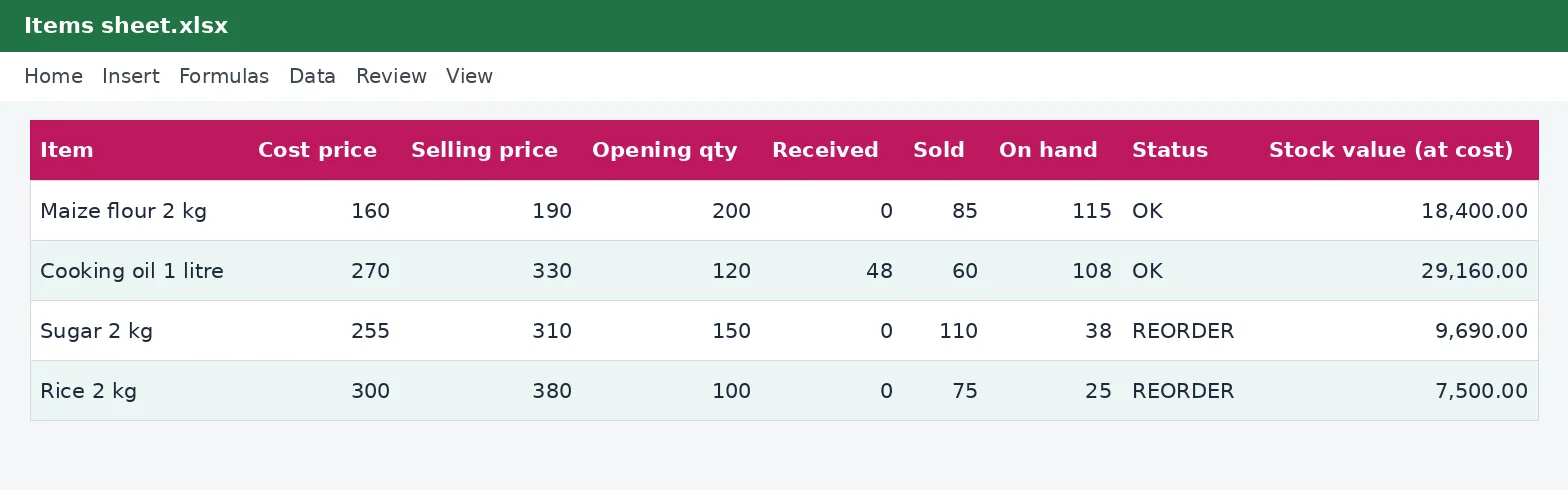
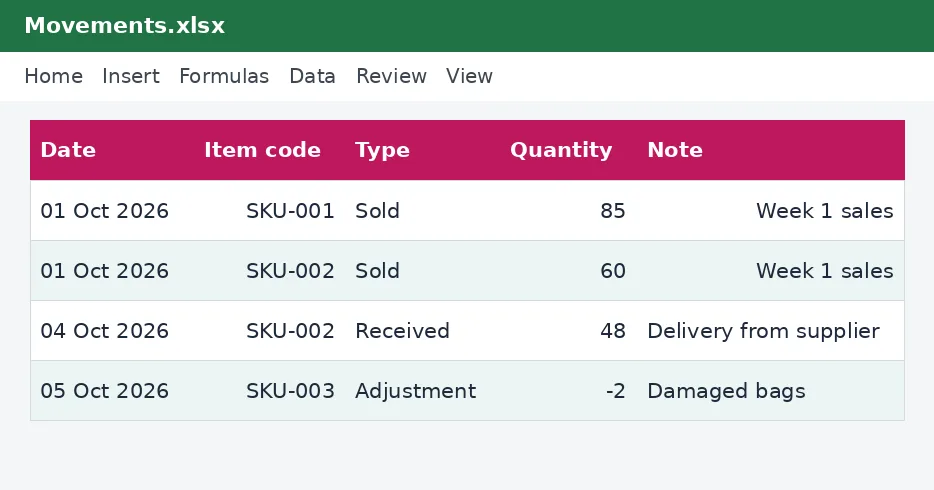
The Items sheet is your product list. Each item has a code, a name, a unit, a cost price, a selling price, the opening quantity and a reorder level. The workbook works out the rest from your records: the quantity received, the quantity sold, adjustments, the quantity on hand, a status, the value of the stock at cost and the margin. The Movements sheet is the log. Every time stock arrives, is sold or is adjusted, you add a line with the date, the item code, the type and the quantity.
- Received: deliveries from suppliers and returns from customers.
- Sold: sales to customers.
- Adjustment: breakages, losses, expiry and stock-take corrections. Use a negative number for a loss and a positive one for a gain.
The status and the reorder level
Each item's status is OK, REORDER or OUT OF STOCK. REORDER appears when the quantity on hand falls to the reorder level you set, and OUT OF STOCK when it reaches zero. A good reorder level covers the sales you expect during the time it takes the supplier to deliver, plus a small buffer. If an item sells 20 a week and takes two weeks to arrive, a reorder level of about 50 is sensible. The two flags are highlighted in colour, and a count at the bottom of the Items sheet shows how many items need attention.
Setting it up
- List your items on the Items sheet with their codes, names, cost and selling prices.
- Count your stock and enter it as the opening quantity.
- Set a reorder level for each item, starting with your best sellers.
- Record each delivery, sale and adjustment on the Movements sheet, using the item code from the drop-down list.
- Check the Status column daily or weekly, and place orders for anything marked REORDER.
Do a stock-take
No record is perfect, so count your stock regularly: weekly for fast movers, monthly or quarterly for the rest. Compare the physical count with the quantity on hand. Where they differ, find out why, then record an adjustment so the tracker matches reality. A pattern of losses on certain items points to theft, damage or a recording problem. Counting also finds slow-moving stock, which is your next job: discount it, bundle it, or stop buying it.
What your stock is worth
The stock value column multiplies the quantity on hand by the cost price. That figure appears in your accounts, and it matters for tax, because your closing stock affects your profit. The cost of goods sold in a year is the opening stock plus purchases minus the closing stock, which is why an honest count at your year-end is not optional. Our guide to the 30 June deadline and the profit and loss statement in this collection show where it fits. Where you are required to issue and receive electronic tax invoices, your purchases and sales in the tracker should match them: see our guide to eTIMS e-invoicing.
Good habits
- Give every item a unique code and stick to it.
- Record movements the same day, not at the end of the month.
- Store stock tidily, with the oldest in front, and watch expiry dates.
- Review slow movers every quarter.
- Keep supplier invoices and delivery notes with the movement record.
This workbook is a stock record and not accounting or tax advice. The example items are illustrations. For stock valuation methods and the tax treatment of stock, speak to your accountant or see the Kenya Revenue Authority.
Related guides, calculators and templates
- Guide: How to build a 12-month cash flow forecast for a small business
- Guide: How to price your products and services: markup, margin and break-even
- Guide: Turnover tax for small businesses in Kenya: rate, limits and when to use it
- Another template: 12-month cash flow forecast
- Another template: Break-even and pricing calculator
- Another template: Budget versus actual tracker
Need something different? Request a custom template, browse all guides or see every Excel template.
Scroll inside the box to read more.