Pricing and markup calculator
Find the price that gives you the margin you need, with and without VAT, and see how it compares with a competitor's price.

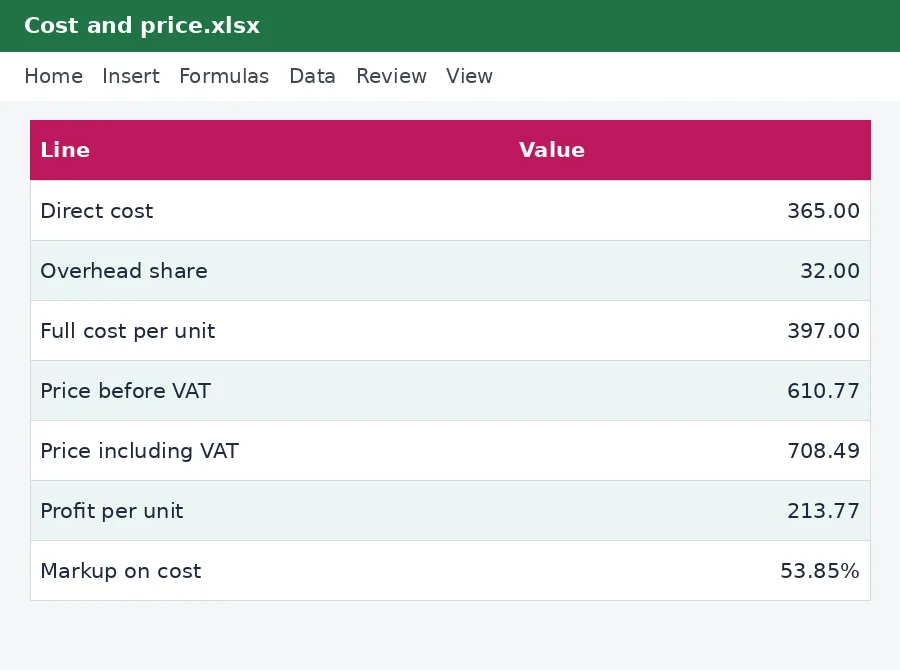
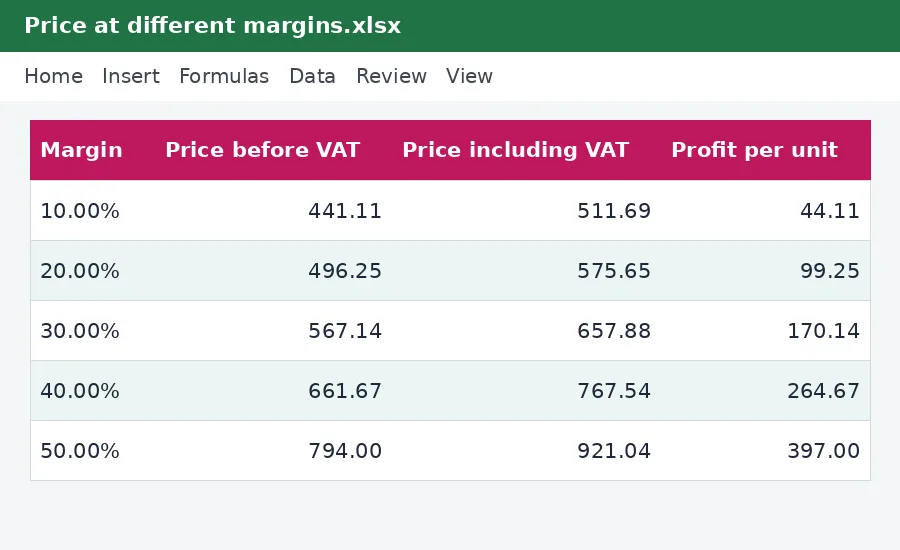
Pricing is not guesswork. Add up the full cost of one unit, choose the margin or the markup you want and the calculator gives you the price, the VAT-inclusive price and the profit per unit. A comparison with a competitor's price shows what you would earn if you matched it, and a table shows the price at margins from 10% to 55%.
What is included
- Full cost per unit with an overhead share
- Price from a target margin or a markup
- Price including VAT
- Comparison with a competitor's price
- Table of prices at different margins
Advertisement
Screenshots
How to use it
- Enter the unit cost and other costs.
- Choose a margin or markup.
- Compare with the competitor.
- Use the table to test other margins.
Rates and thresholds
Edit the VAT rate on the Rates sheet.
Templates are tools to help with your own records. They are not tax or legal advice. Check the figures against official sources before filing or paying.
Advertisement
More in this category
-
 Businesspdf
Small business funding guide for Kenya
The main ways Kenyan small businesses raise money: savings, loans, SACCOs, mobile lenders, grants and investors.
KES 720KES 800-10%
View details →
-
 Businesspdf
SOP writing guide and templates
How to write standard operating procedures that people actually use, with templates for a process, a checklist and a training record.
KES 810KES 900-10%
View details →
-
 Businesspdf
Sales proposal and quotation pack
Win more work with a clear proposal, a professional quotation and a follow-up letter, with a checklist for each step.
KES 630KES 700-10%
View details →
The price is the most powerful number in your business
A small change in price changes profit far more than the same change in sales or costs, and yet most small businesses set prices by looking at the neighbour's shop or by adding a number that feels right. The result is prices that are either too low to cover the real costs or high enough to lose customers for no good reason. This free calculator takes you through the arithmetic in the right order: the full cost of one unit, the margin you need, the price that delivers it, and what happens when a competitor undercuts you.
Margin and markup are not the same thing
This is the most common pricing mistake. Markup is profit as a share of cost: if something costs KES 100 and you sell it for KES 150, the markup is 50%. Margin is profit as a share of the price: the same sale earns KES 50 on KES 150, a margin of 33%. A markup of 50% is a margin of 33%, and a margin of 50% needs a markup of 100%. Mixing them up leads to prices that are far too low. The calculator works with both, so you can see the same price expressed each way.
- Price from a margin = cost divided by (1 minus the margin).
- Price from a markup = cost multiplied by (1 plus the markup).
What goes into the cost
The cost to buy or make a unit is only the beginning. Add the costs that go with every sale: packaging, delivery, transaction fees and damage or waste. Then decide how much of your overheads, such as rent, salaries and utilities, each unit should carry. A simple way is to divide your monthly overheads by the number of units you expect to sell, and enter that as a percentage of the unit cost. The calculator adds all three to give the full cost per unit.
Using the calculator
- Enter the cost to buy or make one unit and the direct costs that go with it.
- Enter the share of overheads each unit should carry.
- Enter the margin you want and read the price before and after VAT, the profit per unit and the markup it equals.
- Or enter a markup instead, and read the price and the margin it gives.
- Enter a competitor's price and the number of units you expect to sell, and compare the profit.
VAT and your price
If you are registered for VAT, the price your customer pays includes VAT at the standard rate, currently 16%, but the VAT is not your income. Set your margin on the price before VAT. The calculator shows both. If you are not registered, which is the case below a turnover of KES 5,000,000 a year unless you register voluntarily, you do not add VAT, and your price is your price. Our VAT calculator will add or remove VAT from any figure, and the invoice and quotation templates in this collection use the same rate.
When a competitor is cheaper
The comparison section shows the profit per unit and the margin if you matched the competitor's price, and your monthly profit at both prices. Sometimes the answer is that you cannot afford to match: the competitor's price is below your full cost, and following them would lose money on every sale. Sometimes it is that you are overpricing. Often the right answer is neither: compete on quality, speed, service or convenience, and hold your price. The table at the bottom shows the price at margins from 10% to 55% so that you can see how much room there is.
Discounts are more expensive than they look
A ten per cent discount on a product with a 35% margin does not cost ten per cent of your profit, it costs almost a third. To earn the same profit you would need to sell about forty per cent more units. Before you discount, put the new price in the calculator and see how many extra sales it must bring to break even. Our break-even and pricing calculator in this collection works out exactly that, from your fixed costs.
This calculator is a planning tool and not financial advice. Real pricing also depends on demand, competition and brand. The VAT rate and threshold on its Rates sheet and in this text come from the KenyaTax rates table and have not yet been verified for the period, so confirm them with the Kenya Revenue Authority.
Related guides, calculators and templates
- Free calculator: VAT Calculator
- Guide: VAT for small businesses in Kenya: when to register and what to charge
- Guide: How to file a VAT return on iTax, step by step
- Guide: How to price your products and services: markup, margin and break-even
- Another template: 12-month cash flow forecast
- Another template: Break-even and pricing calculator
- Another template: Budget versus actual tracker
Need something different? Request a custom template, browse all guides or see every Excel template.
Scroll inside the box to read more.