Project budget and cost tracker
Keep a project inside its budget: record spent, committed and still-to-come costs for each line and see the forecast final cost.

Projects rarely overspend all at once: they drift. This tracker holds the budget for each cost line next to what has been spent, what has been ordered but not paid and what you still expect to spend, and works out the forecast final cost and the variance for every line and for the whole project. A category summary and chart show where the money is going.
What is included
- Up to 100 cost lines
- Spent, committed and estimate to complete
- Forecast final cost and variance
- OVER BUDGET and near-the-limit flags
- Category summary and chart
Advertisement
Screenshots
How to use it
- Enter the project details and budget.
- List each cost line with its budget.
- Update spent, committed and estimates regularly.
- Act on lines marked OVER BUDGET.
Templates are tools to help with your own records. They are not tax or legal advice. Check the figures against official sources before filing or paying.
Advertisement
More in this category
-
 Businesspdf
Small business funding guide for Kenya
The main ways Kenyan small businesses raise money: savings, loans, SACCOs, mobile lenders, grants and investors.
KES 720KES 800-10%
View details →
-
 Businesspdf
SOP writing guide and templates
How to write standard operating procedures that people actually use, with templates for a process, a checklist and a training record.
KES 810KES 900-10%
View details →
-
 Businesspdf
Sales proposal and quotation pack
Win more work with a clear proposal, a professional quotation and a follow-up letter, with a checklist for each step.
KES 630KES 700-10%
View details →
Projects do not overspend in one go. They drift.
Ask the manager of a building project, an event, a software build or a farm development how it is going and you will usually hear that it is on budget. Ask for the number and you may find that they know what has been paid but not what has been ordered, and have not thought about what is still to come. By the time the overspend is obvious, the money is gone. The cure is to track every cost line in four numbers: the budget, what has been spent, what has been committed and what you still expect to spend. Together they give the forecast final cost, which is the number that matters.
The four numbers
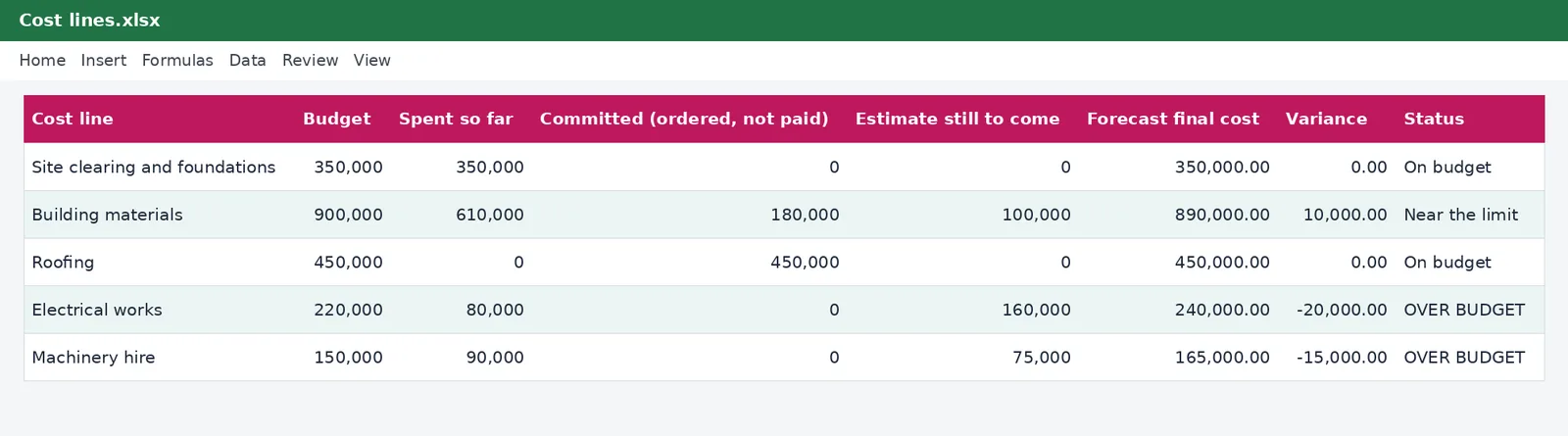
- Budget: the amount approved for this line.
- Spent so far: invoices paid or costs incurred.
- Committed: orders placed and contracts signed that have not yet been paid. This is the number most people forget, and it is the one that causes surprises.
- Estimate still to come: what you expect to spend on this line that you have not yet ordered.
The workbook adds the last three to give the forecast final cost of the line, subtracts it from the budget to give the variance, and sets a status: On budget, Near the limit when the forecast reaches ninety per cent of the budget, or OVER BUDGET in red when it is above it.
Setting up a project
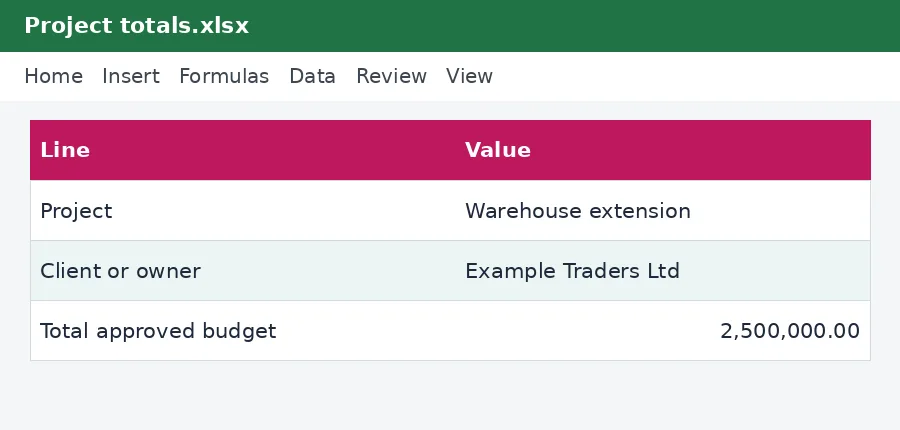
- On the Cost lines sheet, enter the project name, the client or owner, the dates and the total approved budget.
- List each cost line with a category from the drop-down list: labour, materials, equipment hire, subcontractors, travel and accommodation, permits and fees, contingency or other. Enter its budget and who will supply it.
- Check that the budget lines add up to the approved budget. The totals at the top show the difference.
- As the project runs, update the spent, committed and estimate columns at least weekly.
- Read the forecast at the top of the sheet. It tells you whether the project is on course for its approved budget.
Categories and the chart
The By category sheet adds up the lines for each category and shows the budget, the amount spent, the forecast and the variance, with a bar chart comparing the budget and the forecast. That shows you at once whether the pressure is on materials, labour or something else, and where to look for savings.
Contingency and change
A project budget without contingency is a prediction that nothing will go wrong. Include a contingency line, commonly five to fifteen per cent, and treat it as spent when you use it, not as a spare pot. When the client asks for a change, price it before you agree and record it as a new cost line or a change to a budget line, so that the budget moves and the variance does not hide it.
Tax points for project costs
Payments to contractors and professionals may attract withholding tax, which you deduct and pay to the Revenue Authority. Our withholding tax calculator shows the amount on a payment, and the withholding tax schedule in this collection records it. If you claim VAT on supplies, you need valid tax invoices, which are increasingly electronic, and our guide to eTIMS e-invoicing explains the requirement. Keep every invoice, delivery note, certificate of work and proof of payment for at least five years.
Making it a habit
Review the tracker with your team every week. Ask for each line what has changed, what is committed and whether the estimate still holds. Agree actions for anything marked Near the limit before it becomes OVER BUDGET. At the end of the project, compare the final costs with the original budget and write down what you would estimate differently next time. Over a few projects your estimates become much more accurate.
This workbook is a cost-control tool and not financial, legal or tax advice. The example project and figures are illustrations. For contracts, certification and tax treatment, speak to a professional, and see the Kenya Revenue Authority for tax obligations.
Related guides, calculators and templates
- Free calculator: Withholding Tax Calculator
- Guide: Withholding tax in Kenya explained: rates, agents and credits
- Guide: How to get a KRA PIN
- Guide: How to build a 12-month cash flow forecast for a small business
- Another template: 12-month cash flow forecast
- Another template: Break-even and pricing calculator
- Another template: Budget versus actual tracker
Need something different? Request a custom template, browse all guides or see every Excel template.
Scroll inside the box to read more.