Staff cost and headcount budget planner
Budget your payroll for the year: positions, hiring months, pay rises, employer NSSF and Housing Levy, by month and department.

Know what your team will cost before the year starts. List each position with its pay, the months it is filled and any planned pay rise. The planner works out the monthly gross pay, the employer's NSSF and Housing Levy, the total cost by department and the headcount in every month, so you can see the effect of a hire before you make it.
What is included
- Up to 40 positions
- Start and end months and planned pay rises
- Employer NSSF and Housing Levy added
- Headcount and cost in every month
- Cost by department
Advertisement
Screenshots
How to use it
- Check the employer rates on the Rates sheet.
- List each position with pay, start and end month and any rise.
- Read the monthly totals and headcount.
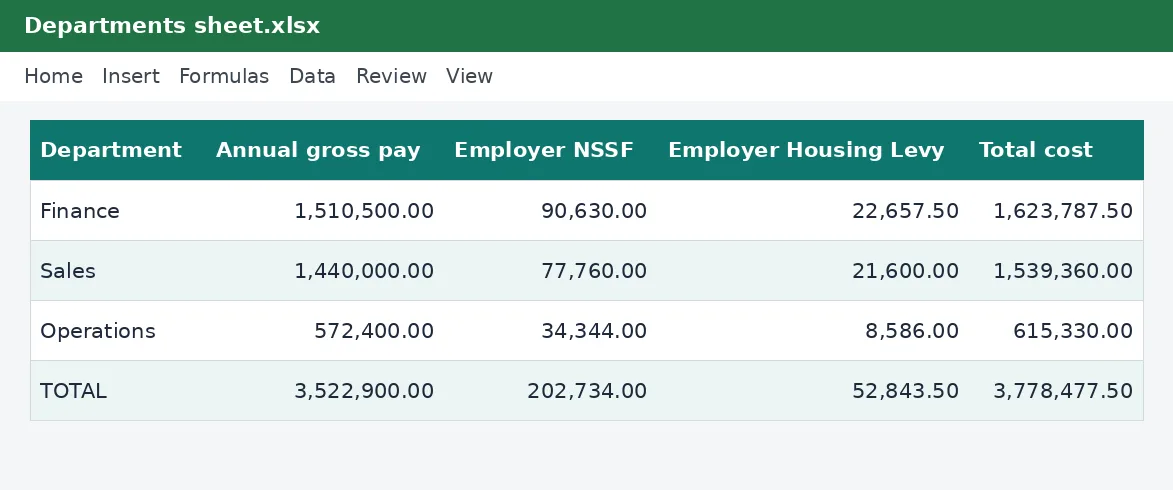
- Compare departments on the Departments sheet.
Rates and thresholds
Edit the employer NSSF and Housing Levy rates on the Rates sheet.
Templates are tools to help with your own records. They are not tax or legal advice. Check the figures against official sources before filing or paying.
Advertisement
More in this category
-
 Payrollpdf
Payroll policy and procedures manual
A written payroll manual: roles, monthly timetable, calculations, approvals, payment, remittances and record keeping.
KES 1,080KES 1,200-10%
View details →
-
 Payrollpdf
Leave policy template for Kenyan employers
A complete leave policy covering annual, sick, maternity, paternity, compassionate and study leave, with how to apply.
KES 540KES 600-10%
View details →
-
 Payrollpdf
Termination and redundancy guide with letters
How to end employment lawfully in Kenya: notice, final dues, redundancy steps and the letters you will need.
KES 900KES 1,000-10%
View details →
Payroll is usually your biggest cost: budget it properly
For most Kenyan businesses, salaries and the contributions on top of them are the largest cost of all, and the one that is hardest to reverse. A hiring decision made in January shapes the cash position in December. Yet many employers budget payroll by multiplying this month's payslips by twelve, which misses the raise you promised, the person you plan to hire in April and the employer's contributions that never appear on a payslip. This planner builds the budget position by position, so the year's staff cost is a number you can rely on.
What goes into the budget
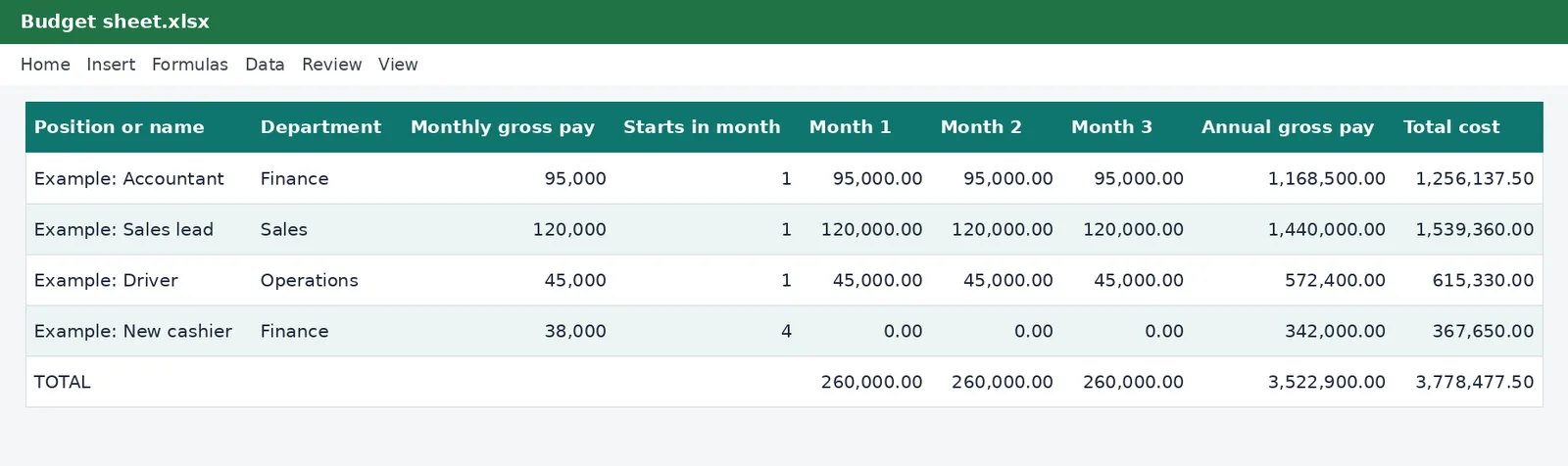
On the Budget sheet each row is a position or a person. You enter the monthly gross pay, the month the position starts and the month it ends, and, if you plan one, a pay rise and the month it takes effect. The planner fills in twelve monthly columns showing the gross pay in each month, which is zero before the position starts and after it ends. Beside them it works out three annual figures.
- Annual gross pay, the sum of the twelve months.
- Employer NSSF, at 6% of pay up to the upper earnings limit of KES 108,000 a month.
- Employer Housing Levy, at 1.5% of gross pay.
- Total cost, which is what the position really costs you for the year.
Totals, headcount and departments
The row at the bottom totals each month and the year, so you can read the payroll bill month by month and drop it straight into your cash flow forecast. Underneath it, the headcount row counts how many positions are filled in each month. The Departments sheet totals the cost for each department that you name, which helps when budgets are held by department heads.
Why employer contributions matter
The employer's NSSF and Housing Levy are paid on top of the gross pay, and employees never see them. For a salary of KES 100,000, the extra cost is a few thousand shillings a month: small for one person and large across a team. Leaving them out of the budget is a common reason that payroll costs exceed the plan. The planner includes them automatically, using the rates on its Rates sheet.
Planning with it
- Enter your current team at their present pay, starting in month 1 and ending in month 12.
- Add planned hires with the month they start, and leavers with the month they end.
- Add any pay rise as a percentage with the month it applies from.
- Read the total cost and the monthly figures, and compare them with your revenue forecast.
- Copy the sheet to try alternatives: hire in April or July, a smaller raise, a part-year contract.
Because every cell recalculates, you can answer a question in a minute: what if we hire two people in March? What does a ten per cent rise for everyone cost? Which department grows fastest? These are the questions that decide whether a plan is affordable.
What this budget does not include
The planner covers gross pay and the employer's statutory contributions. It does not include bonuses unless you add them as pay, nor benefits such as medical insurance, training, uniforms, recruitment fees, severance or leave pay-outs. Add a row for each of these if they matter to you. It also treats a salary as constant across the months in which it applies, so overtime and commission need their own rows. For the take-home effect on individual employees, the PAYE calculator and the gross-to-net salary table are better suited.
Linking to the rest of your finances
Once the budget is set, check the payroll payments it implies against what you can afford, using the statutory remittance tracker, and review actual payroll against the budget every quarter. If you sell goods or services, the break-even calculator shows how many sales you need to cover the staff cost you have planned.
This workbook is a planning tool and not financial or tax advice. The employer rates on its Rates sheet come from the KenyaTax rates table and have not yet been verified for the period, so confirm them with the Kenya Revenue Authority, NSSF and the Social Health Authority before you finalise a budget.
Related guides, calculators and templates
- Free calculator: PAYE Calculator
- Free calculator: NSSF Calculator
- Guide: NSSF contributions explained: tiers, limits and what you pay
- Guide: SHIF contributions explained: rate, minimum and who pays
- Guide: The Affordable Housing Levy explained for employees and employers
- Another template: Monthly payroll workbook (up to 50 employees)
- Another template: Annual PAYE and payroll summary
- Another template: Gross-to-net salary table
Need something different? Request a custom template, browse all guides or see every Excel template.
Scroll inside the box to read more.