Gross-to-net salary table
See the net pay, PAYE, NSSF, SHIF, Housing Levy and employer cost for every salary from KES 10,000 to 500,000, and find the gross pay for a target take-home.

Planning a salary offer or a pay rise? This table shows the full picture for 99 salary levels, in steps of KES 5,000: every statutory deduction, the net pay, the share of gross you keep and what the employer really pays. Type any gross salary for an exact breakdown, or type the take-home you want and read the gross needed.
What is included
- 99 salary levels from KES 10,000 to 500,000
- NSSF, SHIF, Housing Levy, PAYE and net pay for each
- Employer cost including NSSF and Housing Levy
- Quick calculator for any salary
- Gross needed for a target net pay
Advertisement
Screenshots
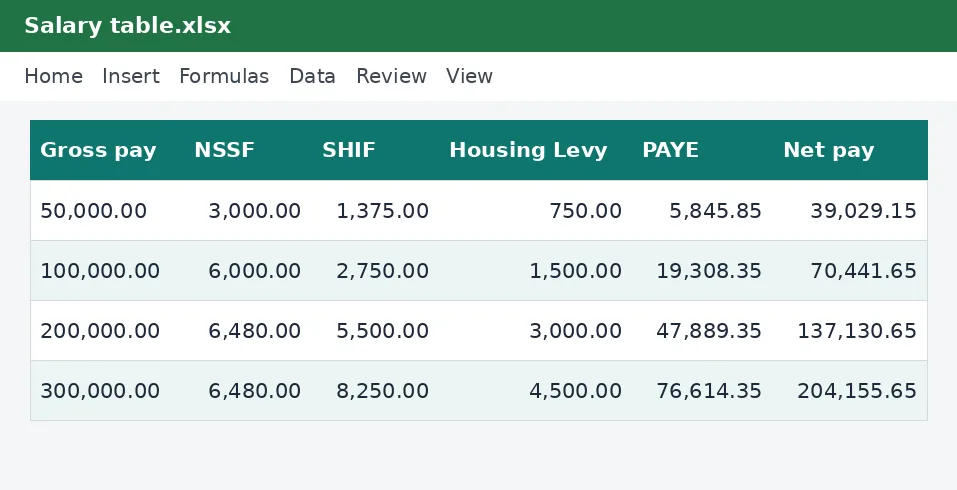
How to use it
- Check the Rates sheet.
- Type a salary in the Quick calculator for an exact breakdown.
- Type a target net pay to find the gross needed.
- Scroll the table to compare salaries.
Rates and thresholds
Edit the rates and PAYE bands on the Rates sheet.
Templates are tools to help with your own records. They are not tax or legal advice. Check the figures against official sources before filing or paying.
Advertisement
More in this category
-
 Payrollpdf
Payroll policy and procedures manual
A written payroll manual: roles, monthly timetable, calculations, approvals, payment, remittances and record keeping.
KES 1,080KES 1,200-10%
View details →
-
 Payrollpdf
Leave policy template for Kenyan employers
A complete leave policy covering annual, sick, maternity, paternity, compassionate and study leave, with how to apply.
KES 540KES 600-10%
View details →
-
 Payrollpdf
Termination and redundancy guide with letters
How to end employment lawfully in Kenya: notice, final dues, redundancy steps and the letters you will need.
KES 900KES 1,000-10%
View details →
The salary conversation, with the numbers in front of you
Every pay negotiation in Kenya has the same awkward moment. The employer talks about gross pay, the employee thinks about what reaches M-Pesa, and the gap between them is a mix of NSSF, SHIF, the Housing Levy and PAYE that nobody has worked out in advance. This table closes the gap. It shows, for every monthly gross salary from KES 10,000 to KES 500,000 in steps of KES 5,000, exactly what is deducted, what the employee takes home and what the employer really pays.
What each column means
- NSSF is the employee's pension contribution: 6% of pay up to the upper earnings limit of KES 108,000.
- SHIF is the health insurance contribution at 2.75% of gross pay, subject to a minimum.
- Housing Levy is 1.5% of gross pay from the employee, matched by the employer.
- Taxable pay is gross pay less the deductions allowed before tax.
- PAYE is the income tax after personal relief of KES 2,400 a month.
- Net pay is what the employee receives, and share of gross shows how much of each shilling they keep.
- Total employer cost adds the employer's NSSF and Housing Levy to gross pay.
Three ways to use the table
1. Check an exact salary
The Quick calculator row at the top takes any gross salary you type and gives the full breakdown to the cent. Use it when you are writing an offer letter or explaining a payslip.
2. Find the gross pay for a target take-home
Often the question is the other way round: an employee wants to take home KES 70,000, what must you pay? Type the target net pay and the table reads off the gross salary that delivers it, interpolating between the two nearest rows. The result is an approximation, usually close to the shilling, and because the tax bands are not a straight line you should confirm the exact figure with the net-to-gross salary calculator before you put it in a contract.
3. Compare salaries side by side
Scroll the table to see how a rise from KES 100,000 to KES 110,000 changes take-home. You will see that extra gross pay is shared with the tax system: the higher the salary, the smaller the share of each extra shilling that the employee keeps. That is useful when you plan rises, and it explains why some employees are disappointed by a raise that looks generous on paper.
What the employer should look at
The last two columns are the ones employers forget. A salary of KES 100,000 does not cost KES 100,000: the employer adds its NSSF and Housing Levy contributions on top. When you budget for a new hire, use the total employer cost column. Our PAYE calculator and payslip generator show the same figures for a single employee with extra items such as allowances and benefits.
Assumptions to know about
- The table treats the salary as all basic pay, with no taxable benefits, allowances, insurance premiums or other reliefs.
- It assumes the employee is a resident, with the standard personal relief.
- It applies the rates on the Rates sheet to a single month's pay. Bonuses, overtime and back pay change the picture for the month they are paid.
- It uses the contribution rules for pay earned in the period set out on the sheet. When a rate changes, update the Rates sheet and the whole table recalculates.
Keeping it current
All rates and the PAYE bands are on one Rates sheet. After each Finance Act, or whenever NSSF, SHIF or the Housing Levy change, compare each figure to the official source and update it. The rates in this workbook come from the KenyaTax rates table and have not yet been verified by us for the period, so confirm them with the Kenya Revenue Authority, NSSF and the Social Health Authority before you rely on them in an offer.
The table is a planning aid, not payroll software and not tax advice. Your own payroll should always be run on each employee's actual figures.
Related guides, calculators and templates
- Free calculator: Net to Gross Salary Calculator
- Free calculator: PAYE Calculator
- Guide: NSSF contributions explained: tiers, limits and what you pay
- Guide: SHIF contributions explained: rate, minimum and who pays
- Guide: The Affordable Housing Levy explained for employees and employers
- Another template: Annual PAYE and payroll summary
- Another template: Monthly payroll workbook (up to 50 employees)
- Another template: Payslip generator
Need something different? Request a custom template, browse all guides or see every Excel template.
Scroll inside the box to read more.