Turnover Tax (TOT) tracker
Record your monthly gross sales, see the turnover tax due and check you are inside the regime's range.

For small businesses on turnover tax. Enter each month's gross sales, see the tax due, and record what you paid. The yearly check warns you if your turnover is outside the range the regime covers.
What is included
- Tax due from gross sales
- Payments and balances
- Yearly range check
Advertisement
Screenshots
How to use it
- Check the rate and range on the Rates sheet.
- Type each month's sales.
- Record your payments.
Rates and thresholds
Edit the Rates sheet if the rate or the range changes.
Templates are tools to help with your own records. They are not tax or legal advice. Check the figures against official sources before filing or paying.
Advertisement
More in this category
-
 Taxpdf
Tax audit survival guide
What to do when KRA announces an audit: the types, your rights, the documents to prepare and how to respond.
KES 1,080KES 1,200-10%
View details →
-
 Taxpdf
Rental income tax guide for landlords
Monthly rental tax or annual return? How landlords register, file, pay and keep records, with a worked example.
KES 720KES 800-10%
View details →
-
 Taxpdf
Withholding tax guide for Kenyan businesses
Who must withhold tax, on which payments, at what rates, and how to remit, issue certificates and keep records.
KES 720KES 800-10%
View details →
A simple way to track a simple tax
Turnover tax was introduced for small businesses that find the full income tax system burdensome. Instead of working out profit, you pay a small percentage of your gross sales every month. For a shop, a salon, a small restaurant or a boda boda business, that can be much easier than keeping full accounts. But it still needs a record: how much did you sell each month, what tax did that create, did you pay it, and are you still inside the limits for using this tax? This tracker answers all four.
How turnover tax works
Turnover tax is charged on gross sales, the total you took for goods and services in the month, before any costs. The current rate is 3%. It is available to resident businesses whose annual turnover is between KES 1,000,000 and KES 25,000,000, and it does not apply to certain kinds of income, such as the income of employees, rent that is taxed elsewhere, and some professional services. The return and the payment are due by the 20th of the month after the sales.
- You pay on sales, not profit, so a bad month with low profit still carries tax on the sales you made.
- You cannot deduct your expenses, which is the trade-off for a simple return.
- If your turnover goes above the upper limit, you must move to the standard income tax rules.
What the tracker does
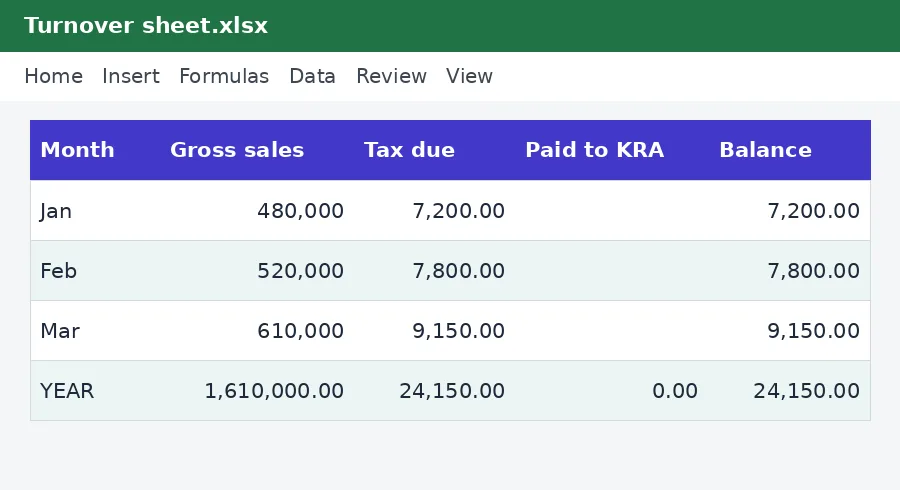
On the Turnover sheet you type your gross sales for each month. The tracker calculates the tax due, and lets you record the amount and date you paid. A Balance column shows any shortfall. A year-to-date total sits at the bottom with a check that compares your annual sales with the lower and upper limits on the Rates sheet. If you creep above the upper limit it warns you, which gives you time to plan, rather than finding out when KRA writes to you.
An example
If your gross sales in January are KES 480,000 and in February KES 520,000, the sheet multiplies each month's sales by the current rate to give the tax due, and totals the year so far. The example rows show this. You enter your sales, and the sheet does the arithmetic.
Is turnover tax right for you?
A business with high costs and a low margin can pay more under turnover tax than it would under the normal profit-based system, because the tax ignores costs. A business with low costs and a high margin usually pays less. The right choice depends on your numbers, and the rules for eligibility and for switching have changed over the years, so check the current position. Our turnover tax calculator gives a quick figure for a single month, and the nil returns guide explains what to do in a month with no sales.
Good habits for a small business
- Record sales every day, from your till, M-Pesa statement or sales book.
- At month-end, total the sales and enter them in the tracker.
- File and pay through iTax by the 20th.
- Keep receipts for the payment together with your sales records.
- Check your running total against the upper limit every quarter.
If you sell goods that carry VAT and your turnover is high enough, you may also have to register for VAT. The VAT calculator and the VAT return working sheet help with that. If you are not yet registered for tax at all, our guides on getting a KRA PIN and registering on iTax are the place to begin.
Please note
This tracker is a record-keeping and calculation aid, not tax advice. The rate and the turnover range on its Rates sheet come from the KenyaTax rates table and have not yet been verified for the period, so confirm them with the Kenya Revenue Authority before you file or pay. If your business has more than one income stream or you are unsure whether you qualify, ask a tax adviser.
Related guides, calculators and templates
- Free calculator: Turnover Tax Calculator
- Guide: Bank reconciliation step by step: match your books to your bank
- Guide: How to build a 12-month cash flow forecast for a small business
- Guide: KRA penalties and interest explained: what late filing and payment cost
- Another template: Annual income tax estimator
- Another template: Instalment tax planner
- Another template: KRA filing and payment calendar
Need something different? Request a custom template, browse all guides or see every Excel template.
Scroll inside the box to read more.