Payslip generator
Fill in one employee's pay and print a clear payslip with PAYE, NSSF, SHIF and Housing Levy worked out.

For a small employer with one or two staff. Type the pay details, and the payslip fills itself in with every statutory deduction and the net pay. Print it or save it as a PDF.
What is included
- Complete payslip on one page
- PAYE, NSSF, SHIF and Housing Levy
- Employer contributions shown separately
- Rates on their own sheet
Advertisement
Screenshots
How to use it
- Check the Rates sheet.
- Fill the yellow cells on the Payslip sheet.
- Print or save as PDF.
Rates and thresholds
Edit the Rates sheet when a statutory rate changes.
Templates are tools to help with your own records. They are not tax or legal advice. Check the figures against official sources before filing or paying.
Advertisement
More in this category
-
 Payrollpdf
Payroll policy and procedures manual
A written payroll manual: roles, monthly timetable, calculations, approvals, payment, remittances and record keeping.
KES 1,080KES 1,200-10%
View details →
-
 Payrollpdf
Leave policy template for Kenyan employers
A complete leave policy covering annual, sick, maternity, paternity, compassionate and study leave, with how to apply.
KES 540KES 600-10%
View details →
-
 Payrollpdf
Termination and redundancy guide with letters
How to end employment lawfully in Kenya: notice, final dues, redundancy steps and the letters you will need.
KES 900KES 1,000-10%
View details →
A clear payslip for every employee, every month
A payslip is more than a courtesy. In Kenya the Employment Act requires an employer to give each employee an itemised statement of how their pay was worked out, showing the gross amount and each deduction. It is also the document employees use when they apply for a loan, rent a house or renew a visa, so it needs to be accurate and easy to read. This free workbook builds that payslip for one employee at a time. You type the pay details into the yellow cells and the page fills in every figure, ready to print or save as a PDF.
What goes on the payslip
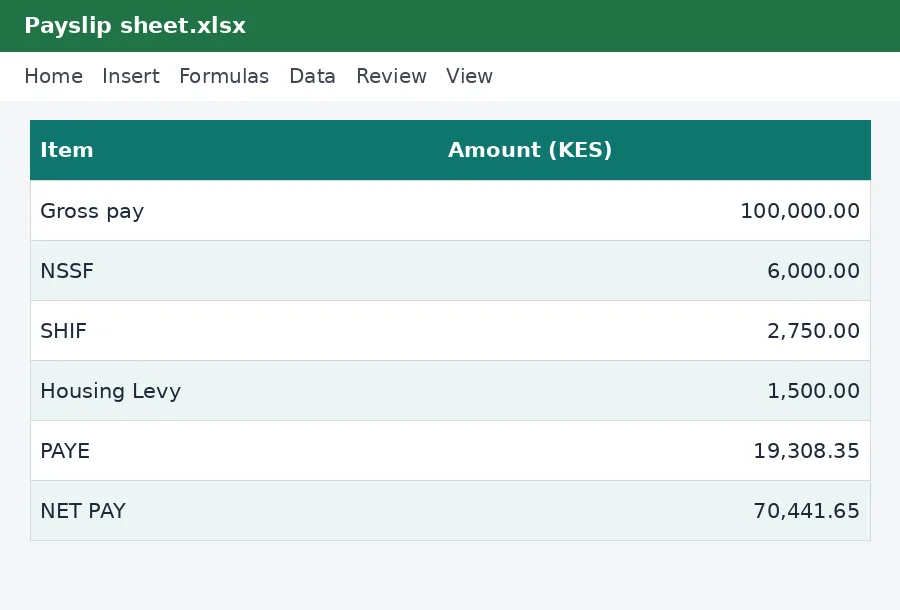
The payslip shows gross pay at the top, then each statutory deduction, then the tax, and finally net pay: the amount that actually goes to the employee. It separates what comes out of the employee's pay from what the employer pays on top, so nobody confuses the two.
- Gross pay: basic pay plus allowances for the month.
- NSSF: the employee's pension contribution, with Tier I up to KES 9,000 of pay and Tier II up to the upper limit of KES 108,000.
- SHIF: the health insurance contribution at 2.75% of gross pay, subject to a minimum.
- Housing Levy: 1.5% of gross pay.
- PAYE: income tax on taxable pay, after personal relief of KES 2,400 a month and any insurance relief.
- Other deductions: staff loans, Sacco contributions and advances, which reduce net pay but not tax.
How to use it in three steps
- Open the Rates sheet and make sure every figure matches the current official rate for the month.
- On the Payslip sheet, type the employer name, the employee's name and KRA PIN, the pay month, and the pay figures.
- Print the sheet or save it as a PDF and give it to the employee. Keep a copy for your records.
Worked example
Take an employee on a basic salary of KES 85,000 with KES 15,000 in allowances. Gross pay is KES 100,000. The workbook works out NSSF, SHIF and the Housing Levy on that gross figure, deducts them before tax to get the taxable pay, applies the tax bands, takes off personal relief, and arrives at PAYE and net pay. You can see every step in the grey cells, so if an employee asks how a figure was reached you can show them. The example row you see when you first open the file is there to show how it works. Type over it with your own figures.
Why employers keep payslips for years
Disputes about pay, tax and contributions can come up long after the month has passed, and the best protection is a clear record. Tax records should generally be kept for at least five years. Save each month's payslip as a PDF named with the employee and the month, and keep them together. If you employ more than a handful of people, the annual P9 return pulls the year together, and our monthly payroll workbook handles many employees at once.
For one employee or a handful
This workbook is ideal for a household employing a driver or a house manager, a small shop with one or two assistants, or a freelancer paying a single assistant. It treats each employee on their own, so you simply change the name and figures for each person. If you have more than a few employees, the monthly payroll workbook is faster because it holds everyone in one table and prints any payslip from a list.
Check the result against the calculators
If you would like to confirm a figure, run the same pay through the KenyaTax payslip generator or the PAYE calculator. The workbook uses the same rules, so the two should agree. If they ever differ, check the Rates sheet first: a rate that was changed in one place and not the other is the most common cause.
Important to remember
This workbook helps you work out and record pay. It is not tax or legal advice and is not connected to the Kenya Revenue Authority. The rates on its Rates sheet are copied from the KenyaTax rates table and have not yet been verified for the period, so confirm them against official sources before you pay anyone. For anything unusual, such as benefits in kind, expatriate staff or special tax status, speak to a tax adviser. The official source is the Kenya Revenue Authority website.
Related guides, calculators and templates
- Free calculator: Payslip Generator
- Free calculator: PAYE Calculator
- Guide: NSSF contributions explained: tiers, limits and what you pay
- Guide: SHIF contributions explained: rate, minimum and who pays
- Guide: The Affordable Housing Levy explained for employees and employers
- Another template: Monthly payroll workbook (up to 50 employees)
- Another template: Annual PAYE and payroll summary
- Another template: Gross-to-net salary table
Need something different? Request a custom template, browse all guides or see every Excel template.
Scroll inside the box to read more.