Statutory remittance tracker (PAYE, NSSF, SHIF, Housing Levy)
Track what you owe each month for PAYE, NSSF, SHIF and the Housing Levy, record payments, and see what is overdue and the estimated cost of late payment.

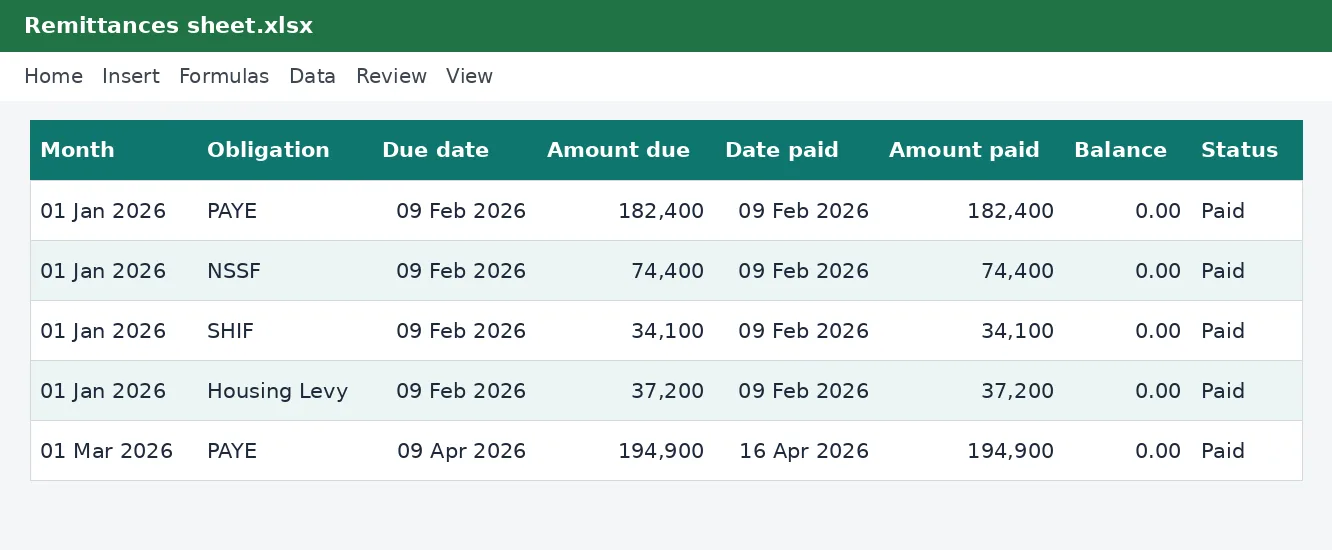
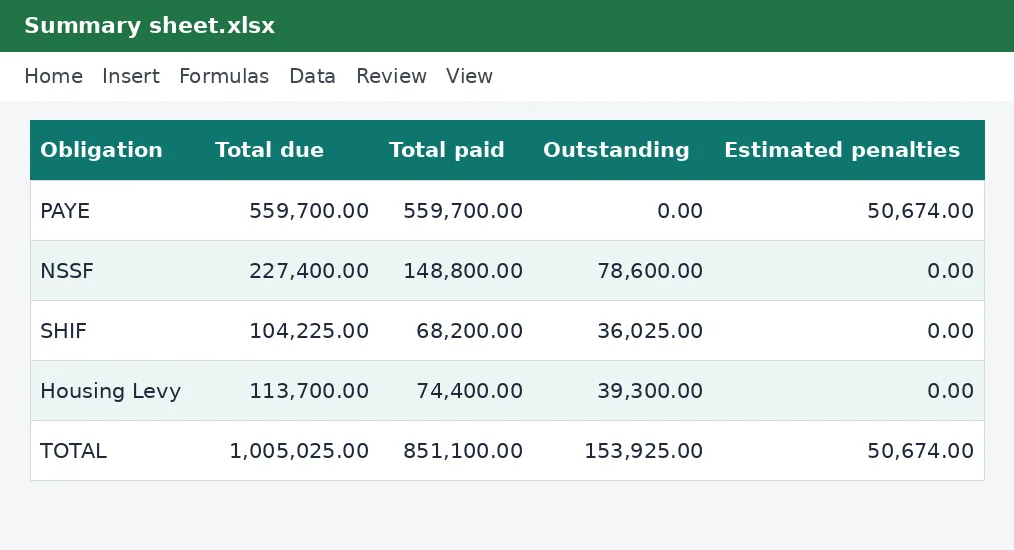
Payroll deadlines are unforgiving, and the penalties add up. This tracker gives every month and every obligation its own row with a due date, the amount due, the date and amount paid, and a status that turns to OVERDUE the day after the deadline. A summary shows the year's totals, the outstanding balance and the estimated penalties.
What is included
- Twelve months by four obligations
- Due dates worked out for you
- Paid, due and OVERDUE status
- Estimated penalty and interest on late payments
- Year summary by obligation
Advertisement
Screenshots
How to use it
- Check the due day and late-payment rates on the Rates sheet.
- Enter the amount due each month from your payroll.
- Record the date and amount when you pay.
- Watch the Status column and the Summary sheet.
Rates and thresholds
Edit the due day and the penalty rates on the Rates sheet.
Templates are tools to help with your own records. They are not tax or legal advice. Check the figures against official sources before filing or paying.
Advertisement
More in this category
-
 Payrollpdf
Payroll policy and procedures manual
A written payroll manual: roles, monthly timetable, calculations, approvals, payment, remittances and record keeping.
KES 1,080KES 1,200-10%
View details →
-
 Payrollpdf
Leave policy template for Kenyan employers
A complete leave policy covering annual, sick, maternity, paternity, compassionate and study leave, with how to apply.
KES 540KES 600-10%
View details →
-
 Payrollpdf
Termination and redundancy guide with letters
How to end employment lawfully in Kenya: notice, final dues, redundancy steps and the letters you will need.
KES 900KES 1,000-10%
View details →
Four payments, every month, with no room for a missed date
Every time you run payroll you create four payments to make: PAYE to the Kenya Revenue Authority, the NSSF contribution, the SHIF contribution to the Social Health Authority, and the Affordable Housing Levy. They are due on the same day, they are paid through different systems, and a missed one carries a penalty and interest. A late payment is not usually a matter of bad faith: it is a matter of a busy month and no reminder. This tracker gives every payment a row, a due date and a status, so what is overdue is never a surprise.
How the tracker is laid out
On the Remittances sheet you enter the year once. The sheet creates a row for each of the twelve months and each of the four obligations, forty-eight rows in all. Each row has the due date worked out for you, the amount due that you copy from your payroll, the date and amount you paid, the balance, a status and the number of days late. The status reads Paid when the balance is cleared, Due with the date while time remains, and OVERDUE as soon as the date has passed without payment.
- Due dates follow the day set on the Rates sheet, normally the 9th of the month after payroll.
- Part payments are handled: the balance shows what is still owing.
- Late payments show the days late and an estimated penalty and interest charge.
- The Summary sheet totals due, paid, outstanding and estimated penalties for each obligation.
About the penalty estimates
The penalty column is a warning, not an invoice. The rates for late payment differ between the Kenya Revenue Authority, NSSF and the Social Health Authority, and they change. The tracker uses KenyaTax's PAYE figures for PAYE, and starts the others at zero so that nothing is guessed: type the rate that applies to you in the Rates sheet table. A late payment penalty is usually a percentage of the amount unpaid, plus interest for each month it stays unpaid. The KRA penalty calculator gives a fuller picture of how those charges build up.
A monthly routine
- When payroll is finished, copy the PAYE, NSSF, SHIF and Housing Levy totals into that month's four rows. The PAYE calculator and the monthly payroll workbook produce these totals.
- Pay each one through its own channel before the due date: iTax for PAYE, and the NSSF and SHA portals for their contributions.
- Record the date and amount paid, and file the payment receipt with your records.
- Look at the Status column. Anything marked OVERDUE needs action today.
- At year end, read the Summary sheet. Every outstanding balance should be zero.
Reconciling with your payroll
The most useful check is to compare the amount due with the amounts in your payroll for the same month. If PAYE due is different from the PAYE deducted on the payslips, something is wrong: a late correction, a missed employee or an error in a rate. The tracker brings that to light in the month it happens, not at the year-end return.
What happens if you are late
If you realise a payment has been missed, pay it as soon as you can. Penalties and interest generally grow with time, so a quick payment limits the cost. Where a payment was late through no fault of yours, or an amount is disputed, speak to the authority concerned. Keep the record of what happened in the tracker's rows. If you owe more than one month, our guide to returns and nil returns explains what else must be filed.
Using it for audits and year-end
When you file the employer's annual return or answer a query, the tracker is your evidence of what was due and what was paid. Save a copy at the end of each year with the year in the file name. The annual summary workbook in this collection pairs well with it: this one tracks payments, that one records the payroll totals.
This workbook is a record-keeping aid and is not tax or legal advice. The due day and the penalty rates on the Rates sheet come from the KenyaTax rates table where available and have not yet been verified for the period. Confirm payment dates and charges with the Kenya Revenue Authority, NSSF and the Social Health Authority.
Related guides, calculators and templates
- Free calculator: KRA Late Filing Penalty and Interest Calculator
- Free calculator: PAYE Calculator
- Guide: Bank reconciliation step by step: match your books to your bank
- Guide: KRA penalties and interest explained: what late filing and payment cost
- Guide: NSSF contributions explained: tiers, limits and what you pay
- Another template: Annual PAYE and payroll summary
- Another template: Gross-to-net salary table
- Another template: Monthly payroll workbook (up to 50 employees)
Need something different? Request a custom template, browse all guides or see every Excel template.
Scroll inside the box to read more.